WRITE FOR US
ItsEasyTech
  • Social Media
    • FacebookFacebook
    • SnapchatSnapchat
    Social Media
    We ItsEasyTech will cover social media guides, tips, and how-tos here. Our content is 100% original and based on in-depth research covering Facebook to TikTok…
    Show More
    Top News
    How To Stop Youtube video rom pausing
    How To Stop YouTube Video From Pausing
    January 25, 2022
    Learn how you can block and unblock someonne on TikTok
    How To Block Someone on TikTok
    January 6, 2026
    How Gyre Helps You To Grow Your YouTube Channel Automatically
    November 26, 2025
    Latest News
    What Do the Eyes Emoji Mean on Snapchat Story?
    July 21, 2026
    How to Delete Twitter Followers (Step-by-Step)
    July 21, 2026
    How to Fix the Server Invite API Down Error in Discord
    July 21, 2026
    Is Telegram Anonymous? The Honest Answer Most People Don’t Expect
    June 18, 2026
  • How To
    How ToShow More
    How to Migrate VMware ESXi to Proxmox
    How to Migrate VMware ESXi to Proxmox: A Practical Pre-Cutover Checklist
    August 16, 2026
    How to Install Freevee on Kodi
    How to Install Freevee on Kodi
    August 1, 2026
    What Does Density Do in Minecraft?
    What Does Density Do in Minecraft?
    August 1, 2026
    See Mutual QFriends On Snapchat
    What Do the Eyes Emoji Mean on Snapchat Story?
    July 21, 2026
    How to Delete Twitter Followers
    How to Delete Twitter Followers (Step-by-Step)
    July 21, 2026
  • Reviews
    ReviewsShow More
    The Best Adobe Photoshop Alternatives
    The Best Adobe Photoshop Alternatives That Don’t Slow Your PC
    July 30, 2025
    Protect Your Privacy: The Case for Anonymous Hosting 
    December 11, 2024
    Plaud Note Review Is This the Best Voice Recorder
    Plaud Note Review: Is This the Best Voice Recorder?
    July 15, 2024
    Forerunner 165 review
    Forerunner 165 Review: Garmin’S Budget OLED Running Watch
    March 4, 2024
    best ufo movies to watch
    The UFO Movies to Put on Your Must-Watch List Today
    October 30, 2023
  • Tech Updates
    Tech UpdatesShow More
    How to Migrate VMware ESXi to Proxmox
    How to Migrate VMware ESXi to Proxmox: A Practical Pre-Cutover Checklist
    August 16, 2026
    What Jobs Can You Actually Get With a CS Degree?
    What Jobs Can You Actually Get With a CS Degree?
    August 3, 2026
    How to Install Freevee on Kodi
    How to Install Freevee on Kodi
    August 1, 2026
    baby massage oil
    Understanding Which Oil is Best for Baby Massage: Ayurvedic Guide for Parents
    July 28, 2026
    Software QA and Testing Services How to Ship Reliable Software Every Time
    Software QA and Testing Services: How to Ship Reliable Software Every Time
    July 24, 2026
  • Business
    • Cryptocurrency
    Business
    Get the latest news and insights from the world of digital currencies, and stay informed about the financial markets with our easy-to-use tools.
    Show More
    Top News
    Bitcoin Trading Risks
    How To Identify & Minimize Bitcoin Trading Risks
    January 17, 2023
    1g Gold Bar
    Should you invest in a 1g gold bar?
    July 5, 2023
    Medical Insurance Myths Indians Should Ignore
    Medical Insurance Myths Indians Should Ignore
    August 19, 2025
    Latest News
    How to Verify a BNB Chain DApp Before You Connect Your Wallet
    August 13, 2026
    Token Launch Marketing: What Web3 Startups Get Wrong Before TGE
    August 8, 2026
    What Jobs Can You Actually Get With a CS Degree?
    August 3, 2026
    Software QA and Testing Services: How to Ship Reliable Software Every Time
    July 24, 2026
ItsEasyTechItsEasyTech
Font ResizerAa
Search
Follow US
© Foxiz News Network. Ruby Design Company. All Rights Reserved.
ItsEasyTech > Social Media > TikTok > How To Delete a TikTok Video
How ToSocial MediaTikTok

How To Delete a TikTok Video

Alex Marz
Last updated: January 6, 2026 8:06 am
Alex Marz
Share
9 Min Read
How To Delete TIkTok Video
SHARE

Have you uploaded an incomplete TikTok video and need help deleting it? How about something strange that you posted and need help deleting? Regardless of what your reason might be, it is easier to delete a TikTok video than to actually create one.

TikTok, a Chinese social networking sensation, has exploded in popularity in recent years, attracting millions of people. You can use TikTok to keep up with the latest trends, watch funny videos, and find interesting content that matches your interests.

Contents
  • Can You Restore Deleted Videos From TikTok?
  • How To Delete a Video on TikTok
    • 1. Open TikTok app
    • 2. Go To Your Profile Section
    • 3. Tap on a Video You Want To Delete
    • 4. Click on Three Dots and Delete
    • 5. Confirm my Tapping Delete
    • 6. Your TikTok Video is Now Deleted
  • How To Delete Your TikTok Video All At Once
    • 1. Open TikTok App
    • 2. Go To Your Profile Section
    • 3. Click on the Hamburger Menu ☰
    • 4. Navigate To Manage Accounts
    • 5. Click on Delete Account
    • 6. Select Your Reason To Delete Your TikTok Account
    • 7. Confirm Deletion
  • What Happens When You Delete Your TikTok Account
  • Why Can’t I Delete My TikTok Account
  • Conclusion
  • Further Reading

Once you learn to use TikTok and add effects, filters, and other features to your videos, you will likely spend a lot of time creating them. If you want to continue to grow your TikTok presence along with your followers, you may want to reinvent yourself over time. The best way to get rid of old videos is to simply delete them. 

But how can you delete a TikTok video? Here you will find different methods to delete your TikTok videos with different options.

  • Can You Restore Deleted Videos From TikTok?
  • How To Delete a Video on TikTok
  • How To Delete Your TikTok Video All At Once
  • What Happens When You Delete Your TikTok Account
  • Why Can’t I Delete My TikTok Account

Can You Restore Deleted Videos From TikTok?

No. you cannot restore your deleted videos from TikTok. TikTok allows you to save your favorite videos on your device, which you can then upload or watch later on your device.

As soon as you delete your video from TikTok, the video will be permanently deleted from the TikTok server along with all of the likes, comments, and views from that video.

Therefore, make sure that you save your favorite video before deleting it, or be careful when deleting videos from your TikTok account.

How To Delete a Video on TikTok

Follow these steps carefully if you want to delete a TikTok video from your profile.

1. Open TikTok app

The first step to delete your TikTok account is to open your TikTok app. Here you can browse and modify different settings, post and delete existing and drafted Tiktok videos. 

2. Go To Your Profile Section

TikTok Profile Delete Video

After you open the TikTok app, you will need to go to your profile section. It is displayed as a Profile icon with “Me” below it on the bottom right corner. 

3. Tap on a Video You Want To Delete
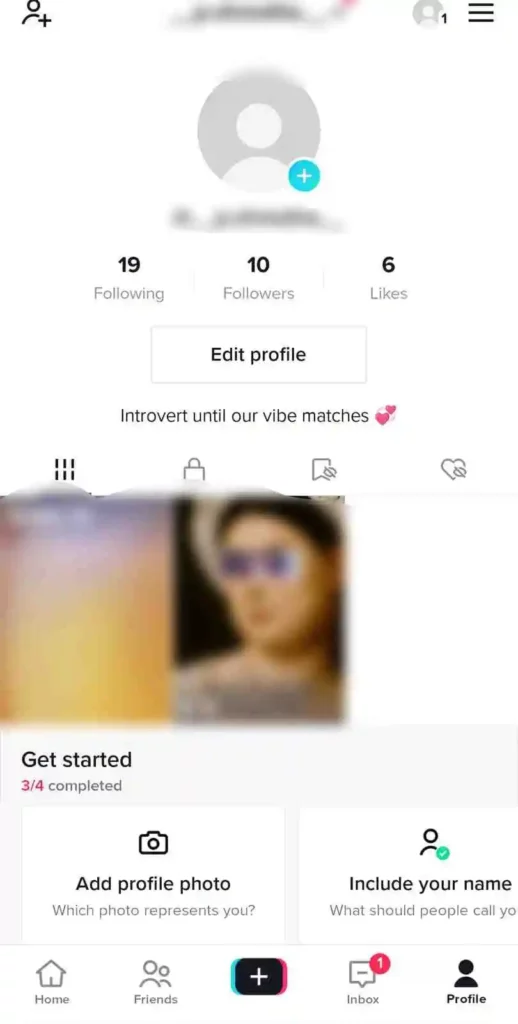
Your existing TikTok videos, along with both public and private ones, can be viewed in your profile section. You can navigate to a particular video on your TikTok account to delete it from there.

4. Click on Three Dots and Delete
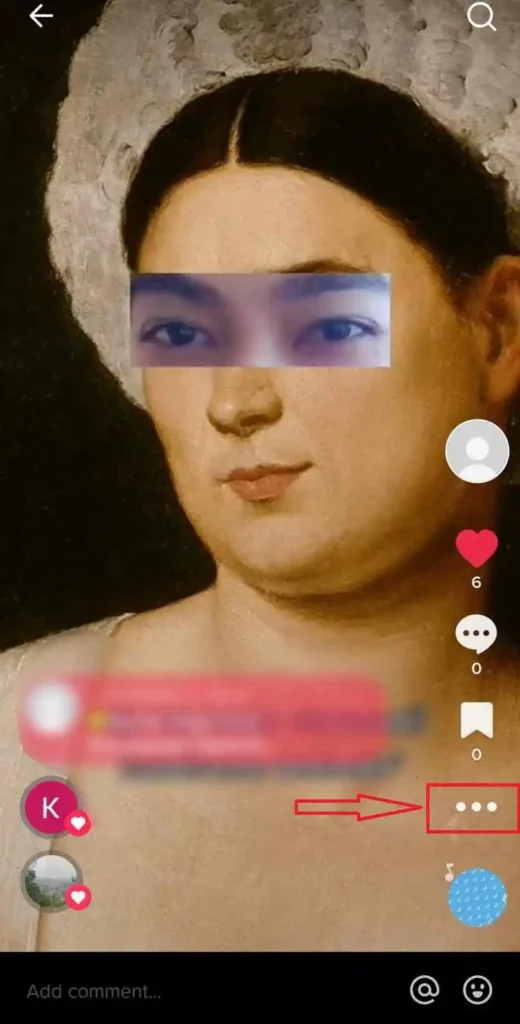
Delete TikTok Video From Account

As soon as you click on the video, you will see different options in the right side corner of your screen. From here, you can check how many people have liked and commented. From here, click on the three dots located below the save icon. 

5. Confirm my Tapping Delete
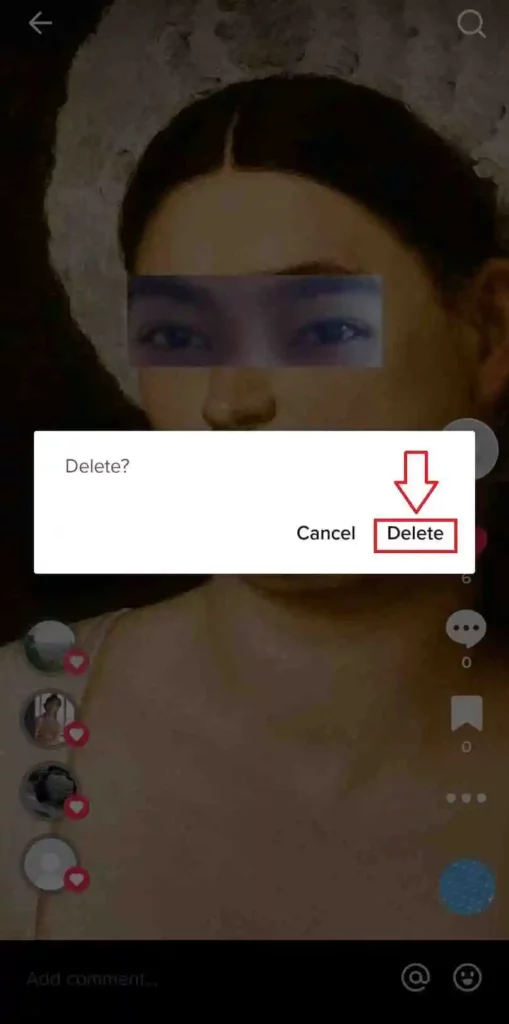
TikTok Video Delete

After you press delete, a Pop-up message will appear asking you to confirm that you wish to delete the TikTok video. Select “Delete” to permanently delete the video from TikTok.

6. Your TikTok Video is Now Deleted

Once you have completed all the steps mentioned above, your TikTok video will now be deleted.

With these easy to follow steps, you can remove your video from TikTok with ease. 

How To Delete Your TikTok Video All At Once

TikTok does not offer a way to delete your videos all at once, but there is a way to do so. The only way to permanently get rid of all the videos that you have uploaded to TikTok is to permanently delete your account. 

We’ll show you how to delete your TikTok account so all your TikTok videos can be removed at one time.

1. Open TikTok App

The first step to deleting your TikTok account and all of its videos is to open up the TikTok app.

2. Go To Your Profile Section

Go to your profile section after opening TikTok. The Profile icon appears below it in the bottom right corner. 

3. Click on the Hamburger Menu ☰
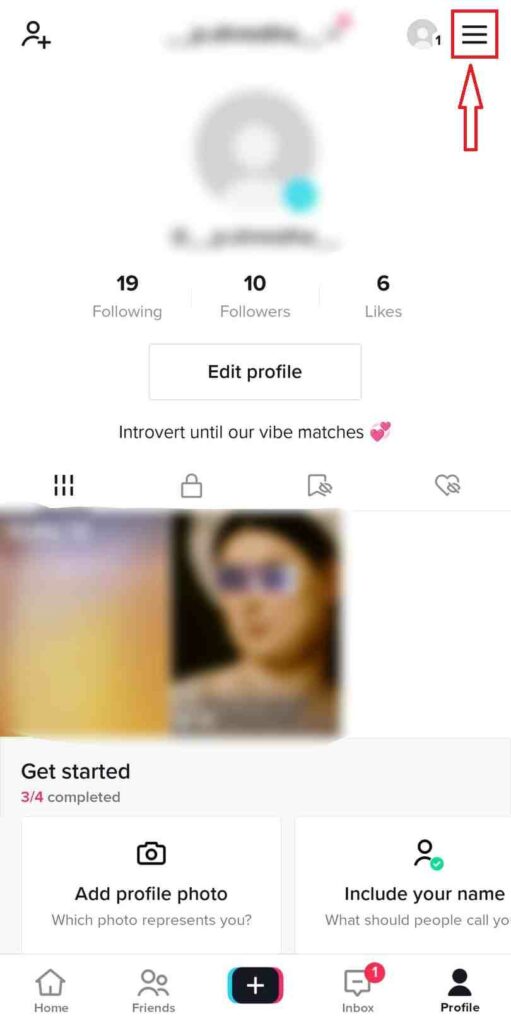
TikTok Hamberger Menu

Your profile section will have a hamburger menu on the top right corner once you access it. Simply click on it to see more options.

4. Navigate To Manage Accounts
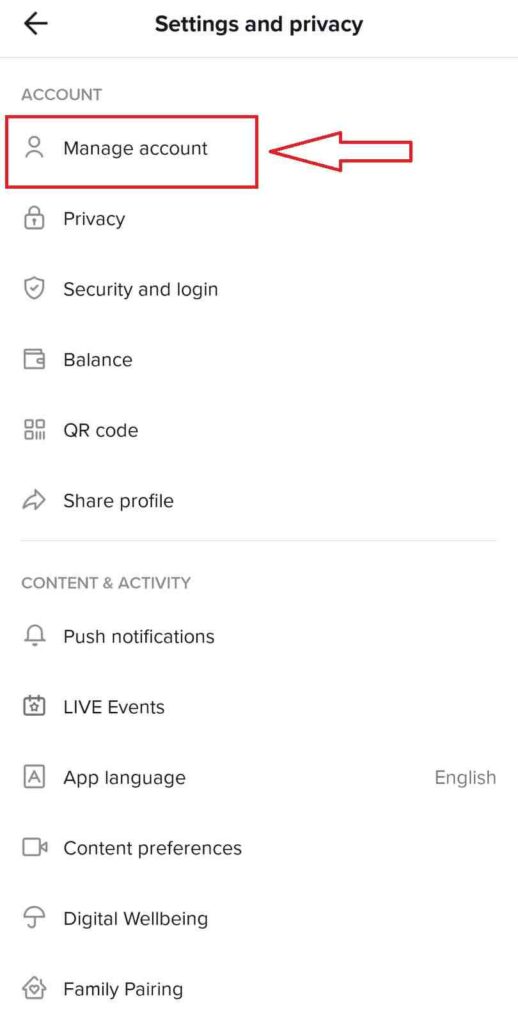
Manage Accounts

Using the hamburger menu, you will be able to see several options such as those shown in the screenshot below. Click on the Manage Accounts tab to learn about additional options for deleting your TikTok account. 

5. Click on Delete Account
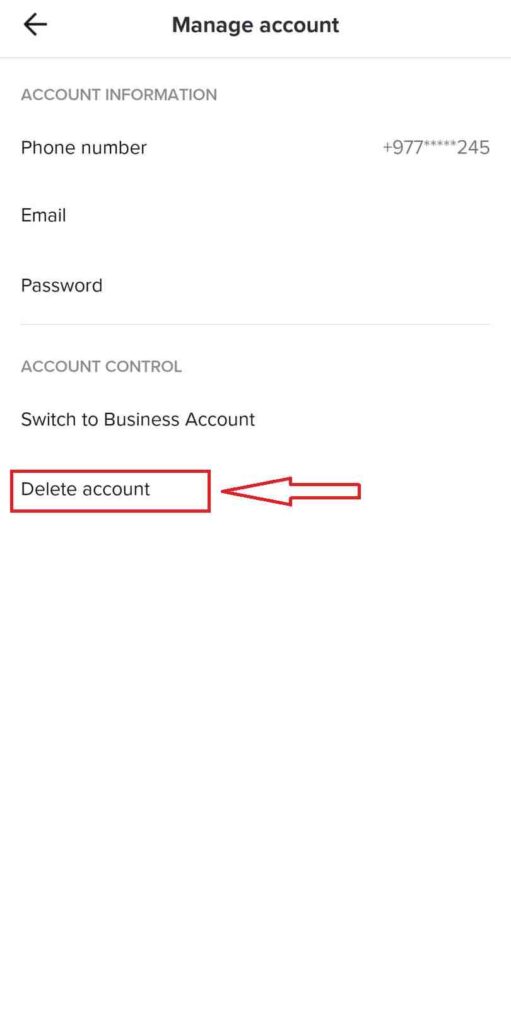
Delete TikTok Account

Once again, you will see a number of options. Click on Delete account to permanently delete your TikTok account and videos.

6. Select Your Reason To Delete Your TikTok Account
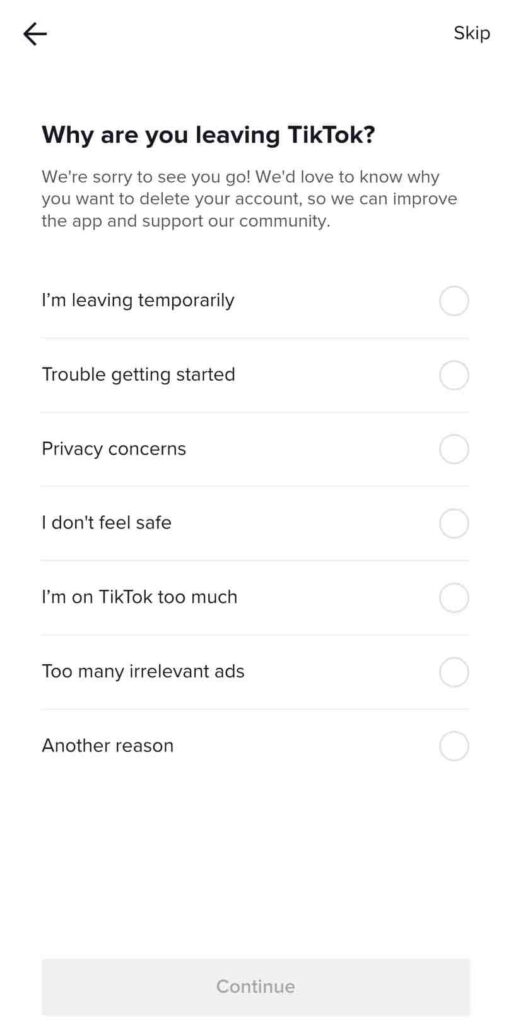
Delete TikTok Reasons

TikTok will ask you to select a reason from the options to delete your TikTok account after clicking on Delete Account. Select the reason you feel is best for you.

7. Confirm Deletion

After selecting your reasons for deleting your TikTok account, TikTok will ask you to confirm the deletion. Once you confirm, Your TikTok account and videos will be deleted.

What Happens When You Delete Your TikTok Account

According to TikTok’s policy, the account will cease to exist for 30 days, after which the account will be deleted. 

In that case, you can still reactivate your account with everything intact, provided you’re within the timeframe. 

However, you will lose access to your account and everything associated with it after 30 days.

As a result, your followers, the videos you’ve ever made, the views, likes and comments will be deleted from TikTok’s servers.

Why Can’t I Delete My TikTok Account

You can’t delete your account on TikTok due to a couple of fairly common reasons. There’s nothing to worry about – they’re all reasonable and pretty simple to fix.

  • No contact info — You must have an email address or a phone number associated with your account in order to delete it. You can remove the account by adding your email address or phone number.
  • Force quit the app — There are times when an app might have a bug and you need to restart it to be able to delete it.

Regardless of your reasons for wanting to delete your TikTok account, you can do so relatively easily. Moreover, if you change your mind, you can reactivate your account within 30 days

Conclusion

TikTok is one of those apps you can play around with, and it is one of the most fun you will ever have.

No matter where your TikTok video appears, you can delete it with just a few taps!

There are a couple of extra steps to complete before sharing your video on TikTok. Using these steps, you can add media such as sound, effects, or text along with hashtags, mentions, and a description to your post.

Nevertheless, if you forget to add music, effects or text to your TikTok video before publishing it, you can delete the video and upload it again with the new effects.

If you have any additional questions or suggestions, you can comment below or feel free to contact us.


Further Reading

Top 10 Most Viewed TikTok Videos of All Time

Similar Posts

How to Migrate VMware ESXi to Proxmox: A Practical Pre-Cutover Checklist
How to Install Freevee on Kodi
What Does Density Do in Minecraft?
Share This Article
Facebook Whatsapp Whatsapp Email Print
ByAlex Marz
CEO Of ItsEasyTech - A Real Newbie Learning To Be A Successful Tech Guide. Loves Tech And Gadgets.

Read More

Armadillo Spawn Rate in Minecraft
July 21, 2026
Township Cheat Codes, Promo Codes & Secrets
July 16, 2026
How to Migrate VMware ESXi to Proxmox
How to Migrate VMware ESXi to Proxmox: A Practical Pre-Cutover Checklist
August 16, 2026
What Jobs Can You Actually Get With a CS Degree?
August 3, 2026
How to Install Freevee on Kodi
August 1, 2026
baby massage oil
Understanding Which Oil is Best for Baby Massage: Ayurvedic Guide for Parents
July 28, 2026
Cryptocurrency

How to Verify a BNB Chain DApp Before You Connect Your Wallet

How to Verify a BNB Chain DApp Before You Connect Your Wallet

Decentralized applications make it possible to interact with financial protocols directly from a crypto wallet. That convenience also changes the user's responsibility. There may be no bank representative, app-store review…

Sunil Thapa
August 13, 2026

Your may also like!

Best Study Apps for Students

6 Best Study Apps for Students in 2026

Alex Marz
April 23, 2026
5 Best Apple Carplay Apps To Use

5 Best Apple Carplay Apps To Use in 2026

Alex Marz
April 20, 2026
best RARBG Torrent Alternative Sites

10 Best RARBG Torrent Alternative Sites in 2026

Alex Marz
April 11, 2026

Always Stay Up to Date

Subscribe to our Newsletter for Daily Updated Tech Contents!

Find us on Social Media

Facebook Pinterest X-twitter Youtube

© 2026 | ITSEASYTECH.COM. All Rights Reserved.

ItsEasyTech

More from ItsEasyTech

  • About Us
  • Disclamier
  • Privacy & Cookie Policy
  • Terms and Condition
  • Write For Us
Welcome Back!

Sign in to your account

Username or Email Address
Password

Lost your password?