
WRITE FOR US
ItsEasyTech
  • Social Media
    • FacebookFacebook
    • SnapchatSnapchat
    Social Media
    We ItsEasyTech will cover social media guides, tips, and how-tos here. Our content is 100% original and based on in-depth research covering Facebook to TikTok…
    Show More
    Top News
    jessee james
    Jesse James West Height, Weight, & Body Measurements
    February 10, 2024
    How To Turn OFf Facebook Comments
    How to Turn off Comments on Facebook Posts
    January 25, 2022
    discord loot boxes
    How to Fix Discord Loot Boxes Not Showing
    April 30, 2024
    Latest News
    How Gyre Helps You To Grow Your YouTube Channel Automatically
    November 26, 2025
    How to Protect Your Privacy on Social Media in 2025
    August 29, 2025
    TikTok’s Hidden Permissions: 3 Settings to Change NOW
    July 21, 2025
    TikTok’s New Algorithm Update: How to Get 10X Views on TikTok Overnight
    July 19, 2025
  • How To
    How ToShow More
    How Gyre Helps You To Grow Your YouTube Channel Automatically
    November 26, 2025
    How to Delete Your Wuthering Waves Account
    How to Delete Your Wuthering Waves Account
    September 23, 2025
    How to Solve Level 2 in I'm Not a Robot
    How to Solve Level 2 in I’m Not a Robot
    September 23, 2025
    How to Solve Level 1 in I'm Not a Robot
    How To Solve Level 1 in I’m Not a Robot
    September 23, 2025
    Building Worlds How 3D Environment Art Services Bring Fantasy Games to Life
    Building Worlds: How 3D Environment Art Services Bring Fantasy Games to Life
    August 29, 2025
  • Reviews
    ReviewsShow More
    The Best Adobe Photoshop Alternatives
    The Best Adobe Photoshop Alternatives That Don’t Slow Your PC
    July 30, 2025
    Protect Your Privacy: The Case for Anonymous Hosting 
    December 11, 2024
    Plaud Note Review Is This the Best Voice Recorder
    Plaud Note Review: Is This the Best Voice Recorder?
    July 15, 2024
    Forerunner 165 review
    Forerunner 165 Review: Garmin’S Budget OLED Running Watch
    March 4, 2024
    best ufo movies to watch
    The UFO Movies to Put on Your Must-Watch List Today
    October 30, 2023
  • Tech Updates
    Tech UpdatesShow More
    Search atlas
    Why Search Atlas Leads the Future of Content Optimization
    December 11, 2025
    What’s the Difference Between Leased Line and MPLS
    What’s the Difference Between Leased Line and MPLS?
    December 3, 2025
    What to Measure When Tracking Employee Communications Success
    What to Measure When Tracking Employee Communications Success
    December 3, 2025
    The Benefits of AI Integration in Business Operations
    The Benefits of AI Integration in Business Operations
    December 2, 2025
    The Benefits of Using a Customer Journey Automation Platform for E-Commerce Businesses
    The Benefits of Using a Customer Journey Automation Platform for E-Commerce Businesses
    December 2, 2025
  • Business
    • Cryptocurrency
    Business
    Get the latest news and insights from the world of digital currencies, and stay informed about the financial markets with our easy-to-use tools.
    Show More
    Top News
    Peer to Peer Trading
    The Concept and Uses of Peer-To-Peer Trading
    June 27, 2023
    How to Choose the Right Fleet Management Software for Your Business Needs
    How to Choose the Right Fleet Management Software for Your Business Needs
    November 13, 2024
    What is cryptocurrency Holo (HOT) and how does it work?
    February 9, 2023
    Latest News
    What to Measure When Tracking Employee Communications Success
    December 3, 2025
    The Benefits of AI Integration in Business Operations
    December 2, 2025
    Simplifying EU Forex Trading: How to Use the Broker Catalog to Find Your Match
    November 22, 2025
    How to Take Your Business from Zero to Hero
    November 5, 2025
ItsEasyTechItsEasyTech
Font ResizerAa
Search
Follow US
© Foxiz News Network. Ruby Design Company. All Rights Reserved.
ItsEasyTech > How To > How To Block Someone on TikTok
How ToSocial Media

How To Block Someone on TikTok

Alex Marz
Last updated: May 7, 2024 3:27 am
Alex Marz
Share
6 Min Read
Learn how you can block and unblock someonne on TikTok
SHARE

Blocking users on TikTok is more than just a simple action; it’s a proactive measure to protect your digital well-being. 

By blocking someone, you effectively sever all ties with that user, preventing them from engaging with your content, commenting on your videos, or even viewing your profile. 

Contents
  • How To Block Someone on TikTok: Step-by-Step Guide
    • Blocking a User via the Mobile App
    • Unblocking a User on the Mobile App
    • Blocking Users on the TikTok Website
    • Unblocking Users on the TikTok Website
  • How To View Your TikTok Blocked List
  • Conclusion

This feature empowers you to take control of your TikTok journey, shielding you from unwanted interactions, harassment, or any form of online toxicity.

How To Block Someone on TikTok: Step-by-Step Guide

TikTok offers multiple options  for blocking users, catering to different preferences and scenarios. 

Whether you’re accessing the platform through the mobile app or the website, the process is straightforward and very simple. 

In this section, we’ll guide you through the step-by-step procedures for blocking individuals on TikTok on Mobile app & Website

More Read

How To Delete TIkTok Video
How To Delete a TikTok Video

Blocking a User via the Mobile App

The TikTok mobile app, available for both Android and iOS devices, provides a seamless and intuitive interface for blocking users. 

Here’s how you can do it:

  1. Launch the TikTok app and navigate to the profile of the user you wish to block.
  2. Locate the “Share” icon, typically represented by an arrow or three dots, and tap on it.
  3. From the options that appear, select “Block.“
  4. Confirm your decision by tapping “Block” again in the pop-up window.
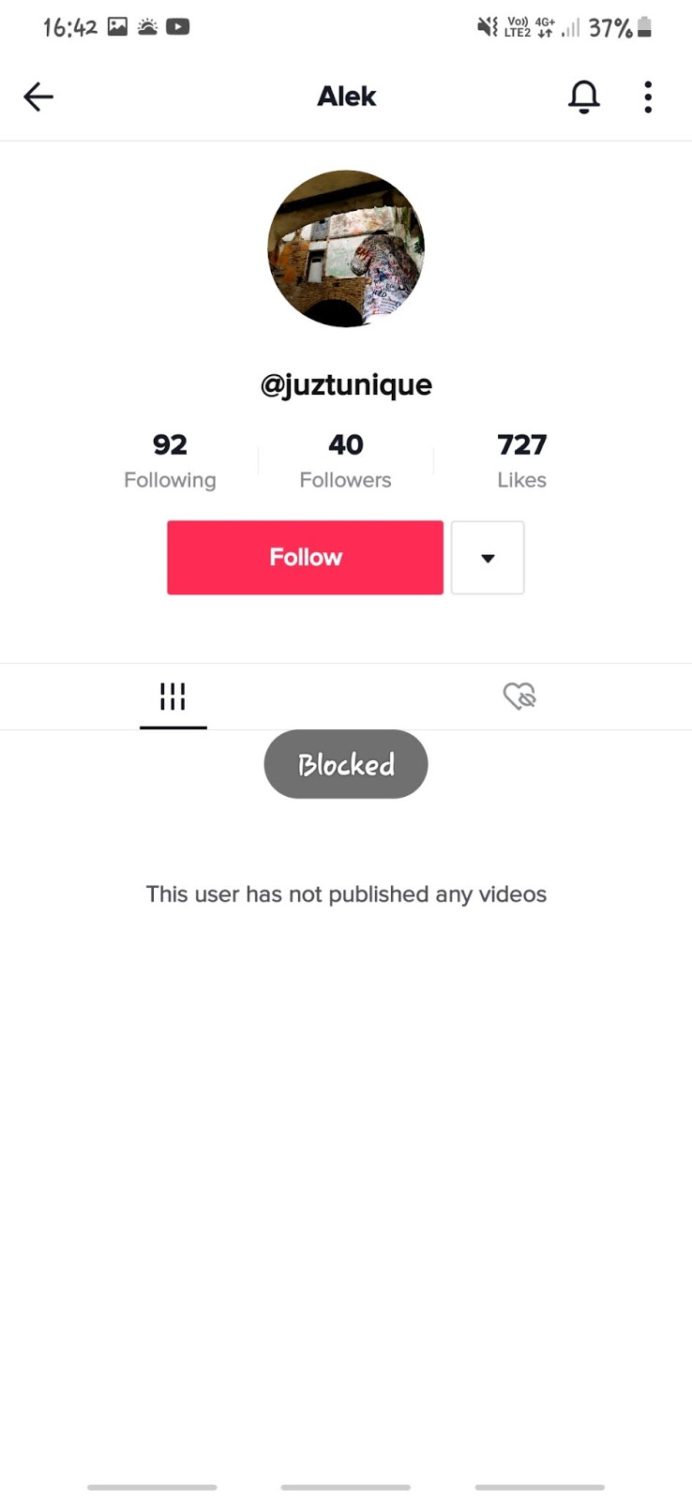
    blocked tiktok

That’s it! With just a few taps, you’ve successfully blocked the user, preventing them from interacting with your content or accessing your profile.

Unblocking a User on the Mobile App

In case you change your mind or accidentally block someone, the TikTok app also allows you to easily unblock users. Simply follow these steps:

  1. Open the TikTok app and locate the profile of the blocked user.
  2. Tap on the “Share” icon or three dots.
  3. Select “Unblock” from the options provided.
  4. Confirm your decision by tapping “Unblock” again in the pop-up window.

By unblocking a user, you restore their ability to view and engage with your content, should you wish to do so.

Blocking Users on the TikTok Website

While the mobile app offers a convenient way to manage your TikTok experience, the website provides an alternative method for blocking users. Here’s how you can do it:

  1. Visit the TikTok website (www.tiktok.com) and log in to your account.
  2. Navigate to the profile of the user you wish to block.
  3. Locate the three-dot icon, typically found near the user’s name or profile picture, and click on it.
  4. From the drop-down menu, select “Block.”
  5. Confirm your decision by clicking “Block” again in the pop-up window.

With a few clicks, you’ve successfully blocked the user from accessing your TikTok profile and content on the web.

Unblocking Users on the TikTok Website

If you need to unblock a user on the TikTok website, the process is equally straightforward:

  1. Visit the TikTok website and log in to your account.
  2. Navigate to the profile of the blocked user.
  3. Locate the three-dot icon or the “Unblock” button beneath the user’s name or profile picture.
  4. Click on the “Unblock” option.
  5. Confirm your decision by clicking “Unblock” again in the pop-up window.

Follow these steps to restore the user’s ability to view and interact with TikTok content on the web.

How To View Your TikTok Blocked List

TikTok understands the importance of keeping track of the users you’ve blocked, and it provides a convenient way to view your blocked list. By accessing this list, you can easily review and manage the accounts you’ve chosen to exclude from your TikTok experience.

To view your blocked list, follow these simple steps:

  1. Open the TikTok app or visit the website and navigate to your account settings.
  2. Locate the “Privacy” section and select “Blocked accounts.”
  3. Here, you’ll find a comprehensive list of all the users you’ve blocked on TikTok.

From this list, you can review the accounts and decide whether to maintain or remove the block, giving you complete control over your digital environment.

Conclusion

Utilizing TikTok’s blocking mechanism, its safety features, and adopting a culture of respect and inclusivity, you can make the most of your TikTok journey, preventing unwanted interactions, harassment, or any other form of online toxicity.

Your digital well-being is paramount, and TikTok gives you the tools to shape your online experience the way you want it.

Take advantage of blocking, reporting, and community building to create an entertaining and creative TikTok experience that is also safe, respectful, and empowering.


Similar Posts

How Gyre Helps You To Grow Your YouTube Channel Automatically
Everything You Need To Know About Marianas Web
How to Delete Your Wuthering Waves Account
Share This Article
Facebook Whatsapp Whatsapp Email Print
ByAlex Marz
CEO Of ItsEasyTech - A Real Newbie Learning To Be A Successful Tech Guide. Loves Tech And Gadgets.
Leave a Comment Leave a Comment

Leave a Reply Cancel reply

Your email address will not be published. Required fields are marked *

Read More

Why Search Atlas Leads the Future of Content Optimization
December 11, 2025
What’s the Difference Between Leased Line and MPLS?
December 3, 2025
What to Measure When Tracking Employee Communications Success
December 3, 2025

Follow Us on YOuTube

- Advertisement -
Ad image
Tech Updates

The Role of Technology in Transforming Freight Shipping

The Role of Technology in Transforming Freight Shipping

Freight shipping has been a crucial component of global trade for centuries, evolving from simple, manual processes to a highly sophisticated industry powered by technology. Technology plays a pivotal role…

Red Eliot
December 7, 2025

Your may also like!

Weird Websites on the Internet

10 Weird Websites On The Internet That Will Leave You Amazed

Alex Marz
August 29, 2025

15 Best Online Video Intro Makers You Should Try in 2025

Alex Marz
August 20, 2025
5 Smart Home Devices That Actually Make Life Easier

5 Smart Home Devices That Actually Make Life Easier

Alex Marz
August 19, 2025

Always Stay Up to Date

Subscribe to our Newsletter for Daily Updated Tech Contents!

Find us on Social Media

Facebook Pinterest X-twitter Instagram Youtube

© 2025 | ITSEASYTECH.COM. All Rights Reserved.

ItsEasyTech

More from ItsEasyTech

  • About Us
  • Disclamier
  • Privacy & Cookie Policy
  • Terms and Condition
  • Write For Us
Welcome Back!

Sign in to your account

Username or Email Address
Password

Lost your password?




