

Are you wondering if you can take a screenshot on OnlyFans?
Are screenshots allowed under the OnlyFans policy? Or can you distribute that screenshot on other sites and pages?
As a creator or a fan, you might have many questions. We will answer them all.
By the end of this article, you will understand whether or not you can take screenshots on OnlyFans, along with some of the OnlyFans company policies.
Without further ado, let’s get started.
- Does OnlyFans Allow Screenshots?
- What Happens If You Screenshot on OnlyFans?
- Will You Be Banned If You Take Screenshots On OnlyFans?
- Is Screenshotting OnlyFans Illegal?
- Does OnlyFans Notify Screenshots?
- What to Do If Someone Is Taking Screenshots of Your Content on OnlyFans
- How Can OnlyFans Creators Protect Themselves From Screenshots?
- How to Keep Your Private Content Secure on OnlyFans
Does OnlyFans Allow Screenshots?
No, OnlyFans doesn’t allow you to take screenshots.
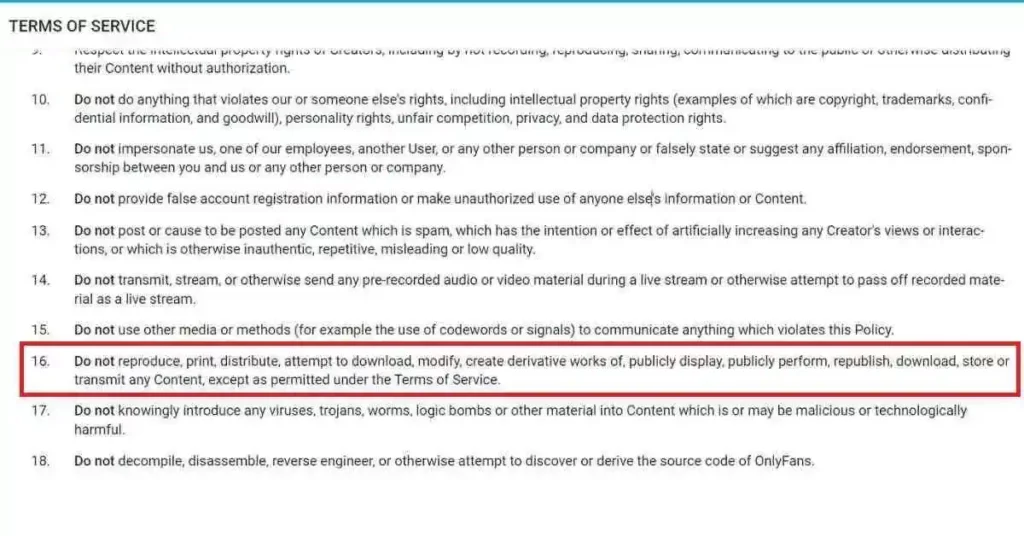
As stated on OnlyFans Terms of Service, You’re not allowed to Print, Distribute, Attempt to Download, Modify, Create. Republish or Store any contents, except permitted under the Terms of Service.
OnlyFans business model relies on subscriptions. Their revenue comes from subscription fees paid by users to creators.
Content on Onlyfans is shared exclusively with people they follow, not for the rest of the world to see.
Even so, some people still find a way to make money by redistributing screenshot images, which is not allowed.
In this case, the copyright team will send you a copyright takedown notice (based on where the content was distributed).
What Happens If You Screenshot on OnlyFans?
As mentioned above, OnlyFans does not allow users to take screenshots.
OnlyFans, on the other hand, doesn’t appear to have any technology to notify or detect screenshots.
Although, distributing screenshots on OnlyFans will result in your account being suspended and your content being taken down by our copyright team.
Additionally, if you are found to be redistributing those screenshots of OnlyFans on your site, you will have your site deindexed by Google.
Will You Be Banned If You Take Screenshots On OnlyFans?
No, your account won’t be banned if you take screenshots on OnlyFans.
However, if you redistribute or republish the content, then your account will certainly get banned.
While some people might find a way around it, they are just scammers, and their accounts are immediately suspended.
The best thing to do when you want a screenshot is to contact the creator you are following and ask for it, but include a link back to their OnlyFans account when you do it.
OnlyFans provides complete control and ownership of the content created by creators.
As a result, when you share their content with non-subscribed users, you are violating their terms of service.
Is Screenshotting OnlyFans Illegal?
Yes, Taking Screenshots on OnlyFans is Illegal.
However, As long as it isn’t for commercial use, you can screenshot anything on the web without repercussions.
In that case, be aware of the risk of your work being stolen and distributed if you are a creator.
Keeping your content off of OnlyFans is a good idea if you are concerned about it getting leaked.
It is highly recommended that you think twice before taking a screenshot on OnlyFans.
You may get into trouble if you use screenshots for shady purposes.
It is highly immoral to take a person’s work and redistribute it on other networks.
OnlyFans policy prohibits the taking of screenshots or downloading of clips. Users may be punished for violating DMCA rules, and their membership may be suspended or stopped.
Onlyfans models who find their work elsewhere can file a DMCA infringement, and the material will be removed.
Does OnlyFans Notify Screenshots?
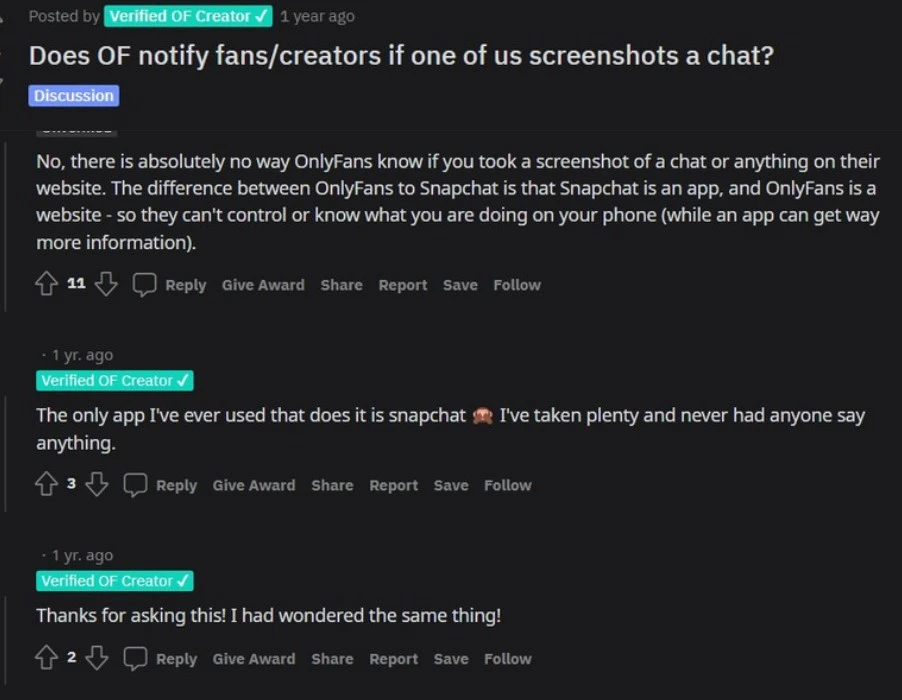
No, OnlyFans does not detect or notify screenshots, unlike Snapchat.
OnlyFans is a website, not an app, so there hasn’t been any technology built yet.
A website has no idea when you take a screenshot from a technical standpoint. Onlyfans only have access to the information you upload on the site.
It is against the rules for OnlyFans subscribers to screenshot a creator’s personal picture.
OnlyFans might not notify a creator that you took a screenshot, but taking a screenshot still impacts their motivation to continue creating content if they learn that you did it.
At the end of the day, Ever subscribers should respect their creators’ work and not distribute, disrupt, or violate their privacy.
How Can OnlyFans Creators Protect Themselves From Screenshots?
The short answer is they cannot.
Although it is illegal, people can take screenshots from OnlyFans creators.
OnlyFans does not know if someone took a screenshot of a chat on the site or anything else.
Snapchat is an app, while OnlyFans is a website – so they can’t access your phone or figure out what you are doing on it (whereas an app can).
However, if a content creator finds a violation of copyright, they can open a support ticket with Onlyfans, which will be passed along to the legal department.
Content creators need solid evidence that someone is redistributing or stealing their work. Rumors of certain users distributing stolen content or screen recordings are not sufficient.
What to Do If Someone Is Taking Screenshots of Your Content on OnlyFans
You’re not alone if you worry someone is taking screenshots of your OnlyFans content. Content theft is a serious problem for creators across all social media platforms, but it’s particularly prevalent on OnlyFans. Here’s what you can do if someone is taking screenshots of your OnlyFans content.
1. Invest in Watermarking Software
If you’re concerned about content theft on OnlyFans, consider investing in a best watermarking software. Using a watermarking software makes it harder for someone to screenshot your content without your authorization.
2. Enable Privacy Settings
OnlyFans has its own privacy settings that allow you to limit the access of your content to those you approve. For example, you can create a private account that only allows people you approve to view your content, making it more difficult for anyone to steal it from you. As a result, it will be much harder for someone to take screenshots of your content without your permission.
3. Report the Screenshot Taker
If someone has already taken a screenshot of your content, don’t hesitate to report them. OnlyFans takes content theft seriously and they may take action against the screenshot taker, such as suspending their account.
The OnlyFans Terms of Service prohibit taking screenshots of other users’ content, so you should know about that. OnlyFans’ customer service team can take steps to limit their activity or even remove them from the platform if someone takes screenshots of your content.
4. File a DMCA Complaint

If you find that someone has shared your content without your permission, you may also want to file a DMCA (Digital Millennium Copyright Act) complaint. A DMCA complaint is a legal document that informs the person sharing your content that they’re infringing on your copyright.
5. Take Legal Action
If all else fails, you may have to take legal action against the person who’s taken screenshots of your content. Depending on the situation, this could involve filing a lawsuit or sending a cease and desist letter.
If you’re concerned that someone is taking screenshots of your content on OnlyFans, take steps to protect yourself. Content theft is a major problem on OnlyFans, but you don’t have to suffer in silence. Watermark your documents, enable screenshot blocking, report the screenshot taker, file a DMCA complaint, and consider taking legal action if the issue gets out of hand.
How Can You Take Screenshot on OnlyFans?
On OnlyFans, screenshotting is not permitted or considered a moral act. That said, you may do it for personal reasons only.
It is illegal to redistribute, download, or use the creator’s contents without permission.
If you copy the creator’s materials or misuse them by screenshotting them, I’m not liable for your actions.
With that being said, let’s see how you can take screenshots on OnlyFans.
- On PC, Simply press PrtScn To Take a Screenshot of OnlyFans.
- On Mac, If you press Shift + Command + 5, you’ll open the Mac screenshot menu, which lets you take both screenshots and videos.
- On Android, press the Power and Volume down buttons at the same time to take a quick screenshot.
- On iPhone, press both the volume-up button and the sleep/wake button at the same time to take a quick screenshot of OnlyFans.
How to Keep Your Private Content Secure on OnlyFans
With the rise of platforms such as OnlyFans, it has become more important than ever to keep your private content secure when it comes to adult content. If you’re already a member of OnlyFans, or if you’re just getting started, here are a few tips.
1. Use Strong Passwords: The first and most important step to keeping your content secure is to use strong passwords. This means avoiding words and phrases that can be easily guessed, and opting for random combinations of numbers, letters, and symbols. It’s also important to use different passwords for all of your accounts, so if one is compromised, your others are still safe.
2. Enable Two-Factor Authentication: Two-factor authentication is an extra layer of security that requires you to enter a code sent to your phone or email address in order to access your account. This effectively eliminates the risk of someone guessing your password.
3. Secure Your Payment Details: If you’re an OnlyFans user, it’s important to make sure that your payment details are secure. To do this, make sure to use a secure connection when entering your payment information. Additionally, be sure to choose a secure payment processor that is not connected to any of your other accounts.
4. Be aware of phishing attacks: Phishing attacks are when hackers attempt to gain access to your account by sending you malicious links or fake messages. Be sure to never click on any links or open any attachments from an unknown sender.
4. Be Smart About What You Share: One of the best ways to keep your content secure is to only share what you are comfortable with sharing with your audience. Before sharing any content on OnlyFans, consider the potential risks. Remember, once something is online, it can’t be taken back, so be sure that you are comfortable with the content before posting it.
By following these tips, you can help ensure that your content remains secure and private on OnlyFans. While it’s important to make sure that you’re following the rules and regulations of the platform, it’s just as important to ensure your private content stays private.
Conclusion
Now you see how undoubtedly easy it is to take screenshots on OnlyFans.
With a few clicks of buttons, the screenshot is captured and saved, and once you have it saved on your PC, you can access it regardless of which OS you have.
However, the Terms of Service for the platform specify that you may only screenshot the content for non-commercial and private purposes.
A creator may file a complaint about copyright infringement if their content has been redistributed or abused.
Perhaps it is not a good idea to stream your face online if you are worried about privacy.
You may save the pictures if you believe it is worthwhile, but we advise you to respect the creators’ effort and avoid exploiting them for commercial purposes.
Further Reading
How To Delete Your OnlyFans Account Permanently
What Does “Other Snapchatters” Mean on Snapchat?
4 Genius Tricks To Read Instagram Messages Without Opening DMs







