

WRITE FOR US
ItsEasyTech
  • Social Media
    • FacebookFacebook
    • SnapchatSnapchat
    Social Media
    We ItsEasyTech will cover social media guides, tips, and how-tos here. Our content is 100% original and based on in-depth research covering Facebook to TikTok…
    Show More
    Top News
    Can we Screenshot on OnlyFans
    Can You Screenshot on OnlyFans?
    January 11, 2023
    How to Fix “Some privacy related extensions may cause issues on x.com”
    How to Fix “Some privacy related extensions may cause issues on x.com”
    August 23, 2024
    How To Hide Likes on Twitter
    How To Hide Likes on Twitter (Step-By-Step)
    August 3, 2023
    Latest News
    How to Turn One YouTube Video into 10 TikToks/Shorts with AI
    January 8, 2026
    Can Someone See if You Search Their Name on Facebook? (The 2026 Myths vs. Reality)
    January 6, 2026
    How to Fix “TikTok Photo Mode Not Showing” (2026 Troubleshooting)
    January 6, 2026
    How Gyre Helps You To Grow Your YouTube Channel Automatically
    November 26, 2025
  • How To
    How ToShow More
    Create Viral Faceless TikTok Horror Stories with AI (2026 Guide)
    January 21, 2026
    iMini vs Sora AI
    Is “iMini AI” Better Than Sora? (Honest Review & Best Alternatives)
    January 21, 2026
    ChatGPT Search vs. Perplexity vs. Google: The Battle for Best AI Search
    January 16, 2026
    cYBERSECURITY
    The benefits of using a digital service provider who highlights the importance of cybersecurity
    January 14, 2026
    Best AI Video Creation Tools in 2026 for Effortless Content
    Best AI Video Creation Tools in 2026 for Effortless Content
    January 14, 2026
  • Reviews
    ReviewsShow More
    The Best Adobe Photoshop Alternatives
    The Best Adobe Photoshop Alternatives That Don’t Slow Your PC
    July 30, 2025
    Protect Your Privacy: The Case for Anonymous Hosting 
    December 11, 2024
    Plaud Note Review Is This the Best Voice Recorder
    Plaud Note Review: Is This the Best Voice Recorder?
    July 15, 2024
    Forerunner 165 review
    Forerunner 165 Review: Garmin’S Budget OLED Running Watch
    March 4, 2024
    best ufo movies to watch
    The UFO Movies to Put on Your Must-Watch List Today
    October 30, 2023
  • Tech Updates
    Tech UpdatesShow More
    iMini vs Sora AI
    Is “iMini AI” Better Than Sora? (Honest Review & Best Alternatives)
    January 21, 2026
    Energy infrastructure
    Energy Management as a Core Layer of Industrial Operational Intelligence 
    January 20, 2026
    Giftcard
    7 essential factors to consider before buying a gift card online for a last-minute present
    January 20, 2026
    ChatGPT Search vs. Perplexity vs. Google: The Battle for Best AI Search
    January 16, 2026
    apc ups
    How to Set Up Your APC UPS: What They Don’t Tell You in the Manual?
    January 14, 2026
  • Business
    • Cryptocurrency
    Business
    Get the latest news and insights from the world of digital currencies, and stay informed about the financial markets with our easy-to-use tools.
    Show More
    Top News
    Everything About Litecoin
    Litecoin: How It Works, Future Prediction Vs. Bitcoin
    January 17, 2023
    Best Solution For Transportation & Logistics Management
    How to Choose the Best Software Solution Transportation & Logistics Management
    April 5, 2023
    Variables Influencing The Price Of Cryptocurrency
    Variables Influencing The Price Of Cryptocurrency
    July 25, 2023
    Latest News
    How to Use ChatGPT to Write SOPs (Plus Free Templates)
    January 8, 2026
    5 Free AI Tools to Remove Watermarks from Images in 2026
    January 7, 2026
    5 AI Agents That Can Automate Your Small Business Invoicing for Free
    January 7, 2026
    Tongits Philippines: Pinatatatag ang Tradisyong Pilipino ng Paglalaro ng Baraha
    January 10, 2026
ItsEasyTechItsEasyTech
Font ResizerAa
Search
Follow US
© Foxiz News Network. Ruby Design Company. All Rights Reserved.
ItsEasyTech > How To > How To Backup and Restore Android Phones
How To

How To Backup and Restore Android Phones

Alex Marz
Last updated: December 15, 2021 4:32 pm
Alex Marz
Share
7 Min Read
How To Backup and Restore Android Phones
SHARE

Android phones and tablets bring us various practical features and larger and larger local storage space. We can freely store data on our Android devices without inserting external memory cards.

However, it is not safe to put all important data in one device, although the Android phone is very powerful. Once you damage or lose your Android phone, you will lose all the files. Therefore, it is necessary to learn how to back up and restore Android data.

Contents
  • Why Should You Back Up and Restore Android Data?
  • The Efficient Way to Back Up and Restore Android Devices
  • 3 Other Ways to Back Up and Restore Android Phones and Tablets
    • 1. Use Your Google Account
    • 2. Use Super Backup & Restore
    • 3. Drag and Drop to PC Manually
  • Final Words

Why Should You Back Up and Restore Android Data?

Your Android phone and tablet are your helpful assistants in your life and work, and the data stored on them is useful to you. As mentioned above, no one can guarantee that your Android device is secure and normally performs all the time.

Besides, the unintended and wrong clicks on your device are the killer of your productivity apps and important files. Thus, you need to back up your data if you don’t want to lose it.

As for restoring data, it is useful to sync the backup data at any time. With it, you can not only get back your lost data but also switch to a new mobile device with ease.

The Efficient Way to Back Up and Restore Android Devices

Coolmuster Android Backup Manager is an efficient program to back up and restore files between Android devices and computers. On the one hand, it supports most Android files, including contacts, text messages, apps, call logs, videos, photos, music, and documents.

And, it supports lots of file formats, such as CSV, VCF, APK, HTML, MP3, MP4, JPG, PNG, EPUB, DOC, PDF, etc. Simply put, it can seamlessly transfer almost all kinds of Android data.

On the other hand, it works for most Android phones and tablets. From Android OS 4.0 to Android OS 12, it can perform smoothly. Additionally, there is no restriction on the brands of Android devices. You can use it on Samsung Galaxy S21 Ultra/S21 Plus/S21/S20/S10/S9/S8/S7, LG W41 Pro/W41 Plus/W41/W31/W11, Honor, Google, OnePlus, Xiaomi, etc.

Standard guide to back up and restore Android data:

Step 1: Download Coolmuster Android Backup Manager

Download and install the software on your PC or Mac, then run it on the desktop.

Step 2: Connect Android to Computer

Use a data cable to connect your Android device to the computer, choose the Transfer Files option, and enable USB debugging on Android. The connection will be established fast.
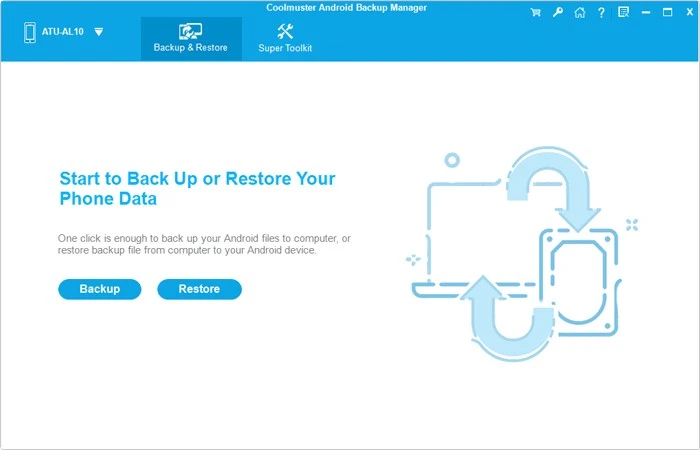
Step 3: Back Up and Restore Android Files

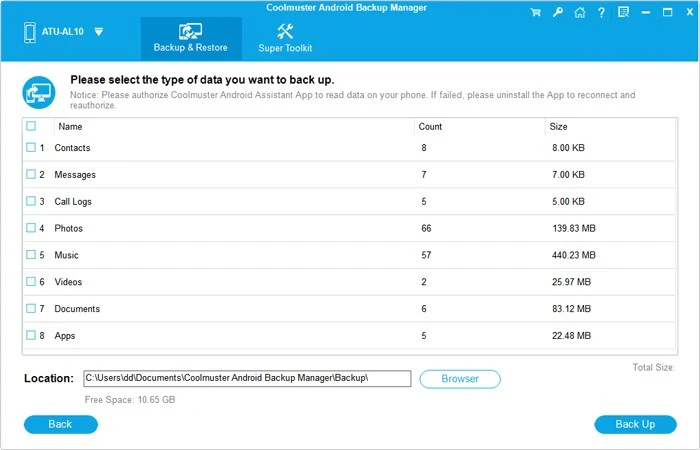
Tap the Backup icon, select the file types you want, and click the Back Up button at the bottom. It will begin to copy your selected files to your computer.
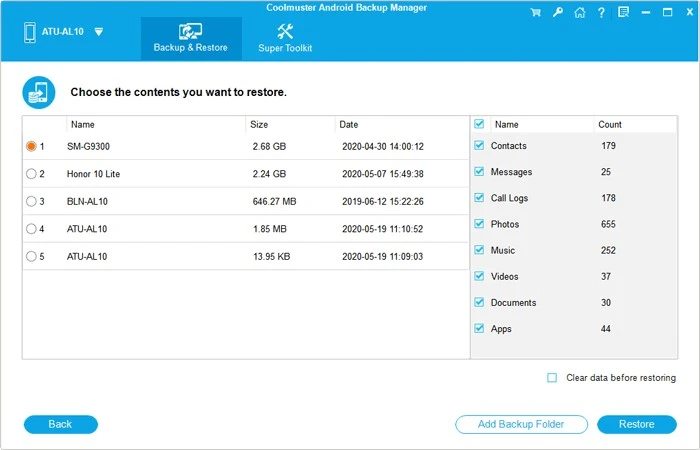
Of course, you can click the Restore icon to transfer your backup data to your Android device.
3 Other Ways to Back Up and Restore Android Phones and Tablets

1. Use Your Google Account

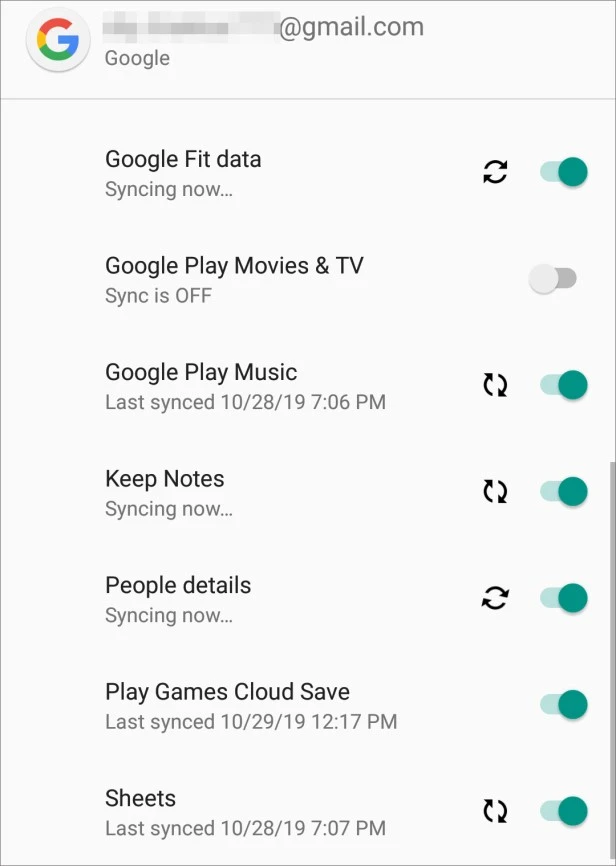
Google backup is a built-in feature on Android mobile devices. As long as you have a Google account, you can back up your Android data to Google Drive without trouble. Simultaneously, you can also restore your backup files to the device via a network.

Moreover, it allows you to sync the backup files on other Android devices with the same Google account. But if the cloud storage is not sufficient, you cannot back up new data via your Google account.

Back up and restore data via a Google account:

  • Add Your Google Account

Go to Settings, and click Accounts > Add account > Google. Then type your account information.

  • Back Up Data to Google Drive

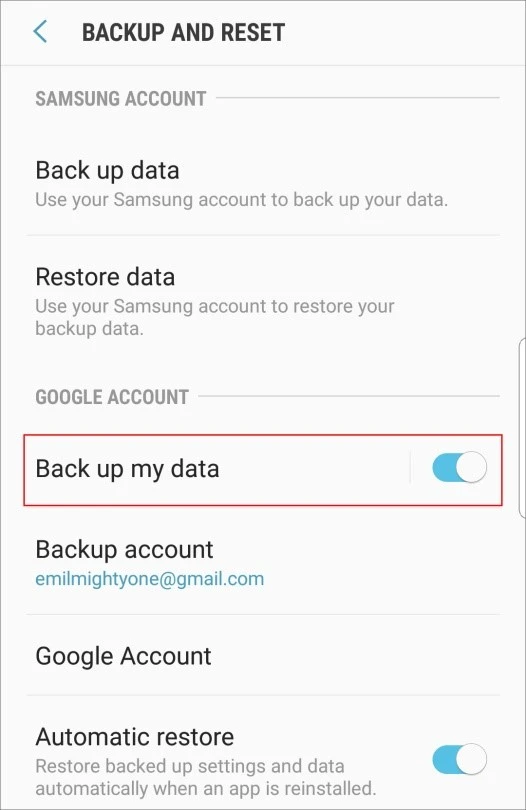
Choose Accounts and backup > Backup and restore, and enable the Back up my data icon. It will back up your data to Google Drive.
  • Sync Data to Your Android Device

To restore files to your Android phone, you can click the Google account, and tap the Sync now icon. By the way, it will also sync new files from Android to Google.
GOogle-ACcounts-Backup-and-Restore

2. Use Super Backup & Restore

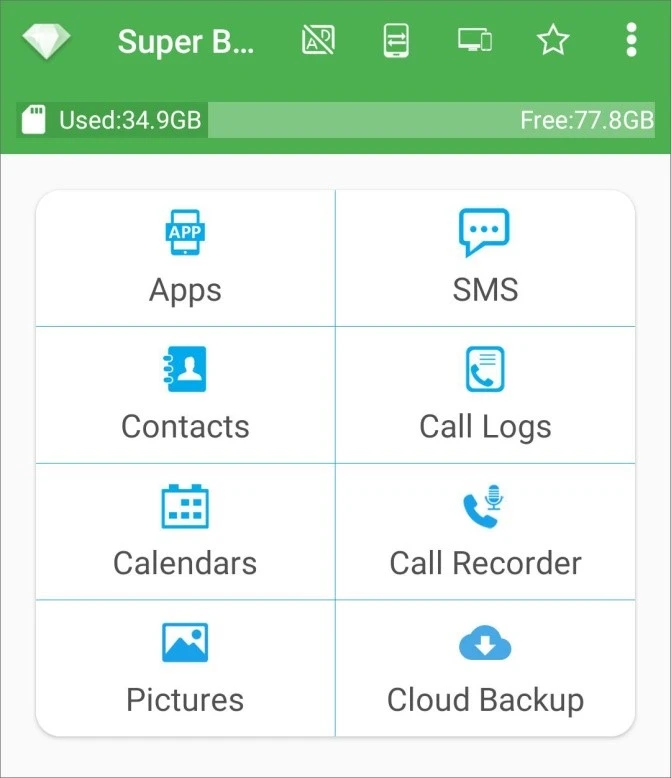
Super Backup & Restore is an application for Android to back up apps, contacts, pictures, calendars, and more, to your SD card. Plus, it can swiftly restore the backup data to your Android smartphone. The automatic backup feature allows you to schedule backups, and it will complete the backup in the background.

Here’s how: Run the app, choose a category, and tap BACKUP to transfer the files to internal or external storage space; to restore data, you can choose the data category you have backed it up, and hit RESTORE to start the procedure.
3. Drag and Drop to PC Manually

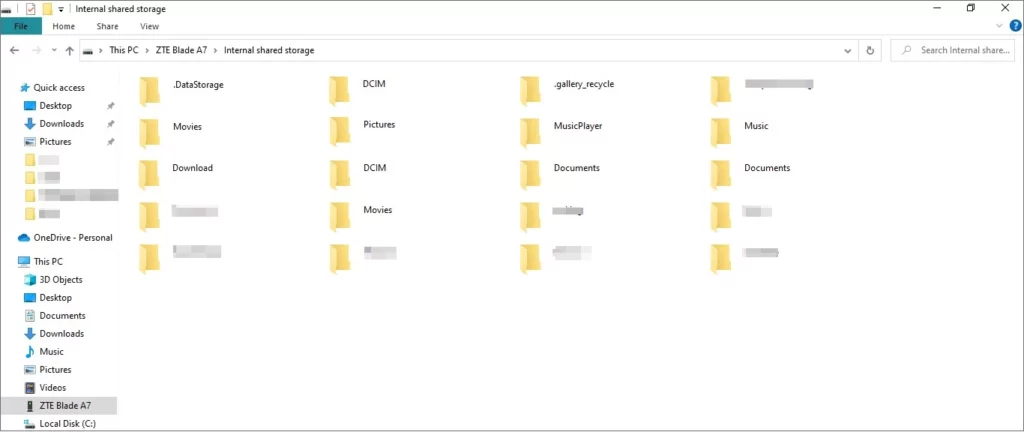
It is widely known that you can back up and restore your data between your Android handset and PC via drag and drop. Although you need to copy data manually, it is suitable to transfer multiple small files.

Here’s how: Link your Android device to the PC via a USB cable, and select the MTP option; double-click This PC, access your mobile device, and find the data you plan to back up; then drag and drop the files to the folder on the PC.
Final Words

Losing important data is horrible. If you don’t want to go through it, please start to back up your Android files with the professional backup tool – Coolmuster Android Backup Manager. It can help you protect most Android files via simple clicks, and transfer your files without loss. Try it, and you will know it is worth your installation.


Similar Posts

Create Viral Faceless TikTok Horror Stories with AI (2026 Guide)
Is “iMini AI” Better Than Sora? (Honest Review & Best Alternatives)
ChatGPT Search vs. Perplexity vs. Google: The Battle for Best AI Search
Share This Article
Facebook Whatsapp Whatsapp Email Print
ByAlex Marz
CEO Of ItsEasyTech - A Real Newbie Learning To Be A Successful Tech Guide. Loves Tech And Gadgets.
Leave a Comment Leave a Comment

Leave a Reply Cancel reply

Your email address will not be published. Required fields are marked *

Read More

Create Viral Faceless TikTok Horror Stories with AI (2026 Guide)
January 21, 2026
Is “iMini AI” Better Than Sora? (Honest Review & Best Alternatives)
January 21, 2026
Energy Management as a Core Layer of Industrial Operational Intelligence 
January 20, 2026

Follow Us on YOuTube

- Advertisement -
Ad image
Tech Updates

7 essential factors to consider before buying a gift card online for a last-minute present

Giftcard

A last-minute present can still feel thoughtful when you pick something people genuinely enjoy using. That is why digital gifting has become a go-to choice for busy shoppers. You can…

Red Eliot
January 20, 2026

Your may also like!

Best AI Video Creation Tools in 2026 for Effortless Content

Best AI Video Creation Tools in 2026 for Effortless Content

Alex Marz
January 14, 2026
10 Weirdest AI Websites

10 Weirdest AI Websites On The Internet 2026

Alex Marz
January 13, 2026
Best websites for No Copyright Sound Effects

7 Best Websites for No Copyright Sound Effects (NCS)

Alex Marz
January 8, 2026

Always Stay Up to Date

Subscribe to our Newsletter for Daily Updated Tech Contents!

Find us on Social Media

Facebook Pinterest X-twitter Instagram Youtube

© 2026 | ITSEASYTECH.COM. All Rights Reserved.

ItsEasyTech

More from ItsEasyTech

  • About Us
  • Disclamier
  • Privacy & Cookie Policy
  • Terms and Condition
  • Write For Us
Welcome Back!

Sign in to your account

Username or Email Address
Password

Lost your password?




