WRITE FOR US
ItsEasyTech
  • Social Media
    • FacebookFacebook
    • SnapchatSnapchat
    Social Media
    We ItsEasyTech will cover social media guides, tips, and how-tos here. Our content is 100% original and based on in-depth research covering Facebook to TikTok…
    Show More
    Top News
    You to subs
    How to Boost Instagram with You to subs?
    June 19, 2023
    Is Telegram Anonymous
    Is Telegram Anonymous? The Honest Answer Most People Don’t Expect
    June 18, 2026
    YouTube Music
    How To Play Youtube Music In Background Without Premium
    April 11, 2026
    Latest News
    What Do the Eyes Emoji Mean on Snapchat Story?
    July 21, 2026
    How to Delete Twitter Followers (Step-by-Step)
    July 21, 2026
    How to Fix the Server Invite API Down Error in Discord
    July 21, 2026
    Is Telegram Anonymous? The Honest Answer Most People Don’t Expect
    June 18, 2026
  • How To
    How ToShow More
    How to Install Freevee on Kodi
    How to Install Freevee on Kodi
    August 1, 2026
    What Does Density Do in Minecraft?
    What Does Density Do in Minecraft?
    August 1, 2026
    See Mutual QFriends On Snapchat
    What Do the Eyes Emoji Mean on Snapchat Story?
    July 21, 2026
    How to Delete Twitter Followers
    How to Delete Twitter Followers (Step-by-Step)
    July 21, 2026
    What Is Website Tinting and How Does It Work?
    What Is Website Tinting and How Does It Work?
    July 21, 2026
  • Reviews
    ReviewsShow More
    The Best Adobe Photoshop Alternatives
    The Best Adobe Photoshop Alternatives That Don’t Slow Your PC
    July 30, 2025
    Protect Your Privacy: The Case for Anonymous Hosting 
    December 11, 2024
    Plaud Note Review Is This the Best Voice Recorder
    Plaud Note Review: Is This the Best Voice Recorder?
    July 15, 2024
    Forerunner 165 review
    Forerunner 165 Review: Garmin’S Budget OLED Running Watch
    March 4, 2024
    best ufo movies to watch
    The UFO Movies to Put on Your Must-Watch List Today
    October 30, 2023
  • Tech Updates
    Tech UpdatesShow More
    How to Install Freevee on Kodi
    How to Install Freevee on Kodi
    August 1, 2026
    baby massage oil
    Understanding Which Oil is Best for Baby Massage: Ayurvedic Guide for Parents
    July 28, 2026
    Software QA and Testing Services How to Ship Reliable Software Every Time
    Software QA and Testing Services: How to Ship Reliable Software Every Time
    July 24, 2026
    What Is Website Tinting and How Does It Work?
    What Is Website Tinting and How Does It Work?
    July 21, 2026
    Enhancing Beverage Production Efficiency Through Line Monitoring and Data Utilization
    Enhancing Beverage Production Efficiency Through Line Monitoring and Data Utilization
    July 19, 2026
  • Business
    • Cryptocurrency
    Business
    Get the latest news and insights from the world of digital currencies, and stay informed about the financial markets with our easy-to-use tools.
    Show More
    Top News
    Tech Problems solutions for remote workers
    5 Tech Problems / Solutions For Remote Workers
    May 18, 2023
    All crypto events in one place Why waste time subscribing to multiple sources
    All crypto events in one place: Why waste time subscribing to multiple sources?
    April 22, 2025
    What Really Happens When You Spend Crypto on a Card
    What Really Happens When You Spend Crypto on a Card
    July 8, 2026
    Latest News
    Software QA and Testing Services: How to Ship Reliable Software Every Time
    July 24, 2026
    Earning Interest on XRP: Staking and Lending Options
    July 20, 2026
    ChartUp Solana Volume Bot Across Pools and Launchpads
    July 20, 2026
    Best ETH Volume Bot: Choosing the Right Dexlift Mode
    July 20, 2026
ItsEasyTechItsEasyTech
Font ResizerAa
Search
Follow US
© Foxiz News Network. Ruby Design Company. All Rights Reserved.
ItsEasyTech > How To > Amazon Error Code CS11 Fix [2022 Updated]
How To

Amazon Error Code CS11 Fix [2022 Updated]

Alex Marz
Last updated: March 7, 2022 5:10 pm
Alex Marz
Share
5 Min Read
Amazon CS11 Error Fix
SHARE

Have you encountered Amazon App CS11 Error Code while browsing Amazon?

What causes these problems and what are the possible solutions?

Contents
  • What is Amazon CS11 Error Code?
  • What Causes Amazon App CS11 Error
  • How To Fix Amazon App CS11 Error
    • 1. Update Amazon App
      • For Android Users:
      • For iOS Users:
    • 2. Check Date and Time
      • For Android Users:
      • For iOS Users:
    • 3. Check App Permissions
      • For Android Users:
      • For iOS Users:
    • 4. Uninstall and Reinstall App
      • For Android users:
      • Alternately, For iOS users:
    • 5. Report To Amazon
  • Conclusion
  • Further Reading

Don’t worry we’re here to solve your Amazon CS11 Error Code.

By the end of the article, you’ll understand the root cause and the way to fix Amazon CS11 Error.

Let’s get started!

What is Amazon CS11 Error Code?

While browsing Amazon Prime, you may have noticed the Amazon CS11 error code.

It occurs when there is a large amount of traffic on a site, leading to the Amazon CS11 error code.

There might be issues with the server due to the high volume of traffic, which sometimes delays the response code and causes an error.

This is the error you see due to a large volume of traffic, which is very common since Amazon receives many visitors each day.

What Causes Amazon App CS11 Error

As stated earlier, the Amazon CS11 Error occurs due to a server issue caused by a large amount of traffic on the server.

It’s a very common problem since Amazon has a growing number of visitors every day.

Amazon is one of the largest multinational companies in the world, primarily focused on e-commerce, streaming digital content, cloud computing, and artificial intelligence.

There are a lot of products to choose from, such as mobile phones, books, dresses, accessories, watches, cameras, shoes, laptops, and e-gift cards.

How To Fix Amazon App CS11 Error

Although this issue gets resolved on its own, you can try these few tricks to fix Amazon App CS11 Error.

1. Update Amazon App

The first step is to update Amazon App on your device.

For Android Users:

  1. Open PlayStore.
  2. Search Amazon app or click on your profile icon in left sidebar and click on My Apps & Games.
  3. Select Amazon and update your Amazon App.

For iOS Users:

  1. Open the App Store.
  2. Tap your profile icon at the top of the screen.
  3. Scroll to see pending updates and release notes.
  4. Tap Update next to an Amazon app to update.

2. Check Date and Time

For Android Users:

  1. On your device, go to the settings.
  2. Click on date and time.
  3. Additionally, you can choose to use 24-hour format or enable Automatic date and time.
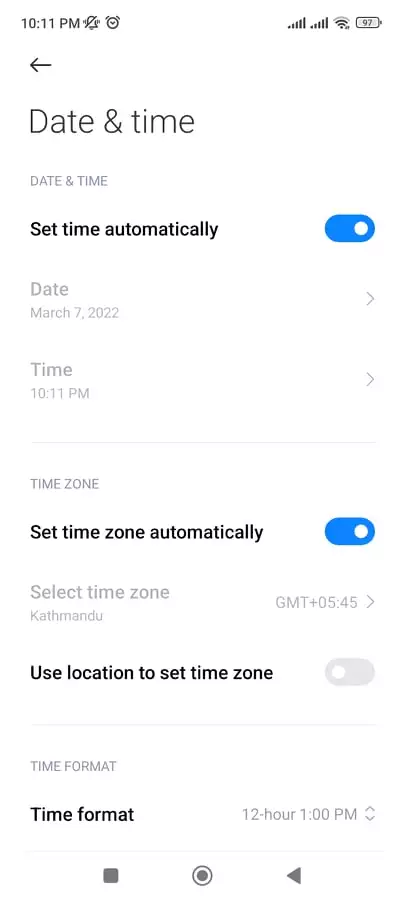
    Date and Time Android

For iOS Users:

  1. Open the Settings app on your device.
  2. Select General, then Date & Time.
  3. Click on Set Automatically.

3. Check App Permissions

For Android Users:

  1. Click on Apps in settings.
  2. Select Amazon from the list.
  3. Click on Permissions and make sure all options are turned on.

For iOS Users:

  1. Go to your device settings.
  2. Scroll down till you locate the Amazon App.
  3. Enable all of the options.

4. Uninstall and Reinstall App

If other methods fail to resolve your Amazon CS11 error, here’s a solution you might try.

All you have to do is uninstall and reinstall your Amazon App.

For Android users:

  1. Go to settings. 
  2. Then Tap on Apps.
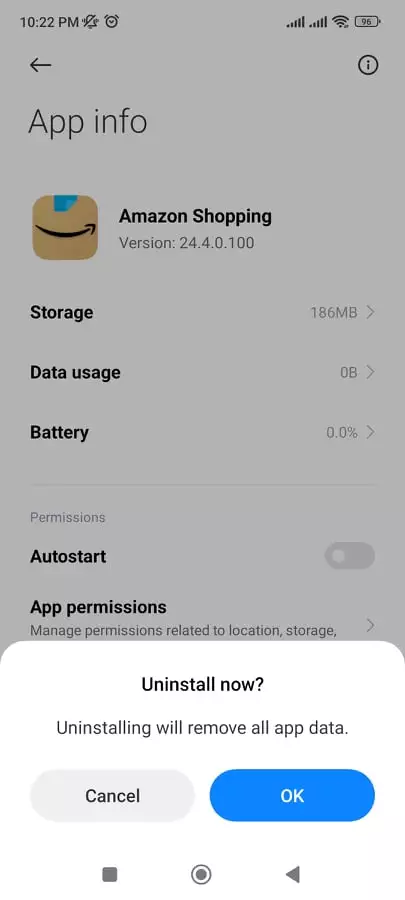
  3. Now select Amazon App and select uninstall.
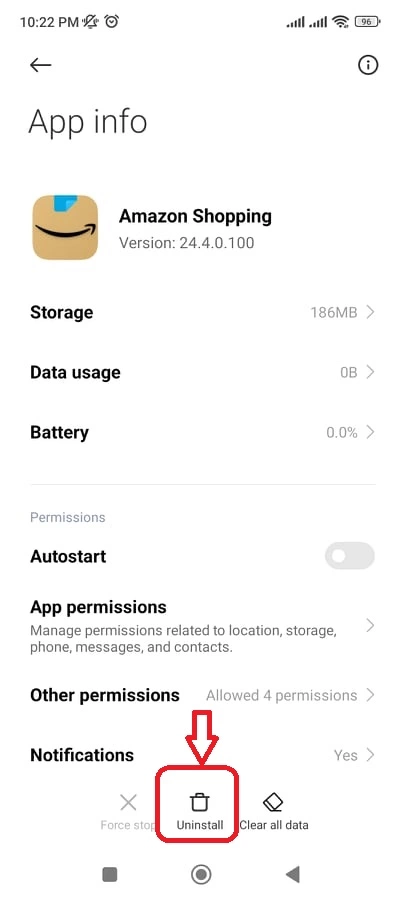
    Uninstall Amazon App
  4. Select Ok to confirm your uninstall.

Alternately, For iOS users:

  1. Touch and hold the Amazon app.
  2. Tap Remove App.
  3. Tap Delete App
  4.  At last, tap Delete to confirm.

5. Report To Amazon

The last option is to contact Amazon Support Team if nothing resolves the Amazon CS11 issue.

Whether it’s about your orders, packages, or technical difficulties, Amazon has you covered.

Amazon’s support team is fast and will respond to emails within 24 hours of business days.

Amazon Specialist can help you by offering you an appropriate solution and fixing the issue if you open a ticket.

Conclusion

That’s all ways you can use to fix Amazon CS11 Error Code.

Many people experience this Amazon issue because of huge traffic and an Amazon server error.

Even so, many people use Amazon services and purchase their items every day.

There are many products that Amazon provides to its millions of customers, either directly or by acting as a middleman between other retailers and Amazon.com’s millions of customers.


Further Reading

How To Fix Server Refused Our Key in Amazon AWS

How To Stop Spotify From Adding Songs To Playlist

Similar Posts

How to Install Freevee on Kodi
What Does Density Do in Minecraft?
What Do the Eyes Emoji Mean on Snapchat Story?
Share This Article
Facebook Whatsapp Whatsapp Email Print
ByAlex Marz
CEO Of ItsEasyTech - A Real Newbie Learning To Be A Successful Tech Guide. Loves Tech And Gadgets.

Read More

Armadillo Spawn Rate in Minecraft
July 21, 2026
Township Cheat Codes, Promo Codes & Secrets
July 16, 2026
How to Install Freevee on Kodi
August 1, 2026
baby massage oil
Understanding Which Oil is Best for Baby Massage: Ayurvedic Guide for Parents
July 28, 2026
Software QA and Testing Services How to Ship Reliable Software Every Time
Software QA and Testing Services: How to Ship Reliable Software Every Time
July 24, 2026
What Is Website Tinting and How Does It Work?
July 21, 2026
Cryptocurrency

Earning Interest on XRP: Staking and Lending Options

Earning Interest on XRP Staking and Lending Options

XRP has come a long way from being just a fast payment token. More holders are now looking at ways to put their XRP to work — generating passive income…

Red Eliot
July 20, 2026

Your may also like!

Best Study Apps for Students

6 Best Study Apps for Students in 2026

Alex Marz
April 23, 2026
5 Best Apple Carplay Apps To Use

5 Best Apple Carplay Apps To Use in 2026

Alex Marz
April 20, 2026
best RARBG Torrent Alternative Sites

10 Best RARBG Torrent Alternative Sites in 2026

Alex Marz
April 11, 2026

Always Stay Up to Date

Subscribe to our Newsletter for Daily Updated Tech Contents!

Find us on Social Media

Facebook Pinterest X-twitter Youtube

© 2026 | ITSEASYTECH.COM. All Rights Reserved.

ItsEasyTech

More from ItsEasyTech

  • About Us
  • Disclamier
  • Privacy & Cookie Policy
  • Terms and Condition
  • Write For Us
Welcome Back!

Sign in to your account

Username or Email Address
Password

Lost your password?