


As you scroll through your Instagram feed, you come across a mysterious label: ‘Instagram User.’ It’s as if a shadow has fallen over their profile, shrouding their identity in secrecy. What does this phrase really mean?
So what exactly does ‘Instagram User’ mean? Did they block/restrict you on Instagram? In this discussion, we will uncover the implications of encountering this label and explore the depths of its significance.
Prepare to unravel the mysteries and discover the truth behind ‘Instagram User’ that will leave you intrigued and wanting to know more.
What does ‘Instagram User’ mean?
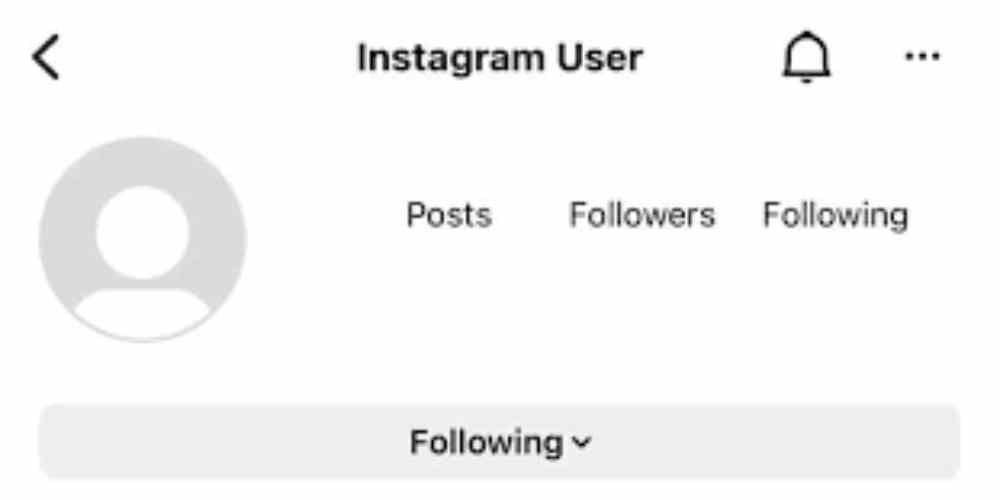
The meaning of ‘Instagram User’ is often associated with being blocked or deleted on the platform. When someone blocks you on Instagram, their username and name are replaced with ‘Instagram User.’ This implies that they don’t want to interact with you or be seen by you on the platform. Being blocked has several implications, including the inability to see their posts, message them, and access your own profile, posts, and stories.
Additionally, your profile information, such as your picture, name, and username, will be hidden. ‘Instagram User’ can also indicate that the person has deleted their Instagram account. The reasons for deleting Instagram accounts vary, ranging from privacy concerns to a desire to disconnect from social media.
Understanding the meaning of ‘Instagram User’ can help you navigate the platform and manage your online interactions.
When do you see ‘Instagram User’ on Innstagram
When encountering the term ‘Instagram User’ on the platform, it’s important to understand the implications it holds, particularly in relation to being blocked or the deletion of an account.
Seeing ‘Instagram User’ is most commonly associated with being blocked. When someone blocks you, their Instagram username and name will be replaced with ‘Instagram User.’ This means you won’t be able to see their posts, message them, or access your profile, posts, and stories. Your profile information, such as picture, name, and username, will be hidden as well.
In direct messages, ‘Instagram User’ implies that the person has blocked you. However, you can still identify them through the messages. Check your direct messages and recent conversations to find out who ‘Instagram User’ is.
Instagram User’ as a Block Indicator
‘Instagram User’ serves as a clear indicator of being blocked on the platform. When someone blocks you, their Instagram username and name will be replaced with ‘Instagram User.’ This is to prevent you from knowing who blocked you.
In addition to the username change, you won’t be able to see their posts anymore. Being blocked also means losing the ability to message the person and access your profile, posts, and stories. Your profile information will be hidden.
To find out who ‘Instagram User’ is, check your direct messages. Open the chat where you see ‘Instagram User’ and recent messages can help you identify the person.
Instagram User’ in Direct Messages
In Direct Messages, the presence of ‘Instagram User’ implies that the person has blocked you. This means that you’ll no longer be able to see their profile picture, name, or username in the chat or your direct messages. However, the messages they sent you’ll still be visible unless they enabled vanish mode.
Instagram uses this feature to prevent you from knowing who blocked you, but you can still identify the blocker through the messages themselves. To find out who the ‘Instagram User’ is, simply check your direct messages and open the chat where you see this label. Recent messages can help you easily identify the person.
If you can’t remember, there are third-party apps available that can provide this information, although they often come at a cost.
Identifying the ‘Instagram User
To identify the ‘Instagram User,’ you can check your direct messages and open the chat where you see this label. Here are some ways to identify the ‘Instagram User’:
- Look for recent messages: Check the chat history to see if you can recall who you were messaging before the label appeared. This can help you identify the person behind the ‘Instagram User’ account.
- Use third-party apps: If you can’t remember the sender of the messages, third-party apps can provide information about the ‘Instagram User.’ However, keep in mind that these apps often come at a cost.
- Analyze the content: Pay attention to the content of the messages to gather clues about the person behind the ‘Instagram User’ label.
- Compare profiles: If you have access to other social media platforms where the person might’ve the same username or profile picture, you can compare them to confirm their identity.
Finding Out Who ‘Instagram User’ Is
To determine the identity of the ‘Instagram User,’ there are several strategies you can employ.
First, check your direct messages. Open the chat where you see ‘Instagram User’ and review the recent messages. This can help you easily identify the person behind the username.
However, if you can’t remember, there are third-party apps available that can provide you with the information you need. Keep in mind that these apps often come at a cost. They can help you uncover the true identity of the ‘Instagram User’ by bypassing the block or providing additional data.
Understanding the Implications of Blocking
Understanding the implications of blocking on Instagram can provide valuable insights into the limitations and consequences of this action. When someone blocks you on Instagram, it can have a significant impact on your relationships and emotional well-being. Here are four key aspects to consider:
- Loss of connection: Blocking someone means you lose the ability to message them and access their profile, posts, and stories. This can result in a breakdown of communication and the loss of a connection you once had.
- Hidden information: When you’re blocked, your profile information, such as your picture, name, and username, will be hidden from the person who blocked you. This can create a sense of exclusion and rejection.
- Emotional effects: Being blocked can lead to feelings of hurt, rejection, and confusion. It can be challenging to deal with the emotional impact of being excluded from someone’s online presence.
- Relationship strain: Blocking someone can strain relationships and create tension between individuals. It can lead to misunderstandings, resentment, and the deterioration of the relationship.
Understanding these implications can help individuals navigate the complexities of blocking on Instagram and find healthier ways to address conflicts and disagreements.
Impact on Messaging and Profile Access
When someone blocks you on Instagram, it not only results in the loss of connection and hidden information but also has a significant impact on your ability to message them and access their profile. Blocking on Instagram has serious consequences for communication and profile access. Here are the key impacts of being blocked:
| Impact on Communication | Consequences of Blocking |
|---|---|
| Inability to message the person | You won’t be able to send direct messages to the person who blocked you. |
| Hidden profile information | Your access to their profile, posts, and stories will be restricted. |
Being blocked on Instagram severely limits your ability to interact with the person who blocked you. You lose the ability to send direct messages, and their profile information becomes hidden from your view. This can have a significant impact on your communication and connection with them.
Instagram User’ and Profile Visibility
‘Instagram User’ is a term commonly seen when someone has either blocked you or deleted their Instagram account, resulting in limited profile visibility. The impact of blocking on profile visibility includes the following:
- Your ability to see their posts is restricted.
- Your access to their profile information, such as picture, name, and username, is hidden.
- You lose the ability to message the person and access your profile, posts, and stories.
- In direct messages, their profile picture won’t be visible, but the messages they sent you’ll still be visible unless they enabled vanish mode.
To find out who the ‘Instagram User’ is, you can check your direct messages and open the chat where you see the term. Recent messages can help you easily identify the person. If you can’t remember, third-party apps can provide the information, but often at a cost.
Conclusion: What Does ‘Instagram User’ Mean
To summarize the implications of ‘Instagram User’ and provide a clear understanding of its meaning, it’s crucial to decode this term and its significance.
‘Instagram User’ is often associated with being blocked on the platform. When someone blocks you, their Instagram username and name are replaced with ‘Instagram User,’ and you lose the ability to see their posts, message them, and access your profile. It’s a way for Instagram to prevent the blocked person from knowing who blocked them.
However, ‘Instagram User’ can also indicate that the person deleted their account. In direct messages, seeing ‘Instagram User’ implies that the person has blocked you, but you can still see the messages they sent unless they enabled vanish mode.
To find out who ‘Instagram User’ is, check your direct messages or use third-party apps.







