
WRITE FOR US
ItsEasyTech
  • Social Media
    • FacebookFacebook
    • SnapchatSnapchat
    Social Media
    We ItsEasyTech will cover social media guides, tips, and how-tos here. Our content is 100% original and based on in-depth research covering Facebook to TikTok…
    Show More
    Top News
    How To See How Many Friends You Have on Snapchat
    How To See How Many Friends You Have on Snapchat
    March 10, 2022
    How to Auto-Delete Facebook Posts After 30 Days (Without Plugins)
    How to Auto-Delete Facebook Posts After 30 Days (Without Plugins)
    July 19, 2025
    best funny kahoot names
    50 Best Creative and Funny Kahoot Names
    January 10, 2024
    Latest News
    Does Facebook Notify When You Save a Photo?
    April 14, 2026
    How to See Deleted Messages in Discord (3 Easy Methods)
    February 3, 2026
    How to Turn One YouTube Video into 10 TikToks/Shorts with AI
    January 8, 2026
    Can Someone See if You Search Their Name on Facebook? (The 2026 Myths vs. Reality)
    January 6, 2026
  • How To
    How ToShow More
    does facebook notify when you save a photo
    Does Facebook Notify When You Save a Photo?
    April 14, 2026
    How to block adult content on iPhone
    How to Block Adult Content on iPhone in 4 Easy Ways
    April 14, 2026
    How to Edit Email Signature Outlook Settings Quickly
    How to Edit Email Signature Outlook Settings Easily
    April 11, 2026
    How to Type the Degree Symbol on a Mac Keyboard
    How to Type the Degree Symbol on a Mac Keyboard
    April 11, 2026
    Why Small Businesses in Kent Are Rethinking How They Handle IT
    Why Small Businesses in Kent Are Rethinking How They Handle IT
    March 17, 2026
  • Reviews
    ReviewsShow More
    The Best Adobe Photoshop Alternatives
    The Best Adobe Photoshop Alternatives That Don’t Slow Your PC
    July 30, 2025
    Protect Your Privacy: The Case for Anonymous Hosting 
    December 11, 2024
    Plaud Note Review Is This the Best Voice Recorder
    Plaud Note Review: Is This the Best Voice Recorder?
    July 15, 2024
    Forerunner 165 review
    Forerunner 165 Review: Garmin’S Budget OLED Running Watch
    March 4, 2024
    best ufo movies to watch
    The UFO Movies to Put on Your Must-Watch List Today
    October 30, 2023
  • Tech Updates
    Tech UpdatesShow More
    WHY THE FIRST 5 YEARS OF RETIREMENT ARE THE MOST DANGEROUS
    WHY THE FIRST 5 YEARS OF RETIREMENT ARE THE MOST DANGEROUS
    April 15, 2026
    How to block adult content on iPhone
    How to Block Adult Content on iPhone in 4 Easy Ways
    April 14, 2026
    How to Edit Email Signature Outlook Settings Quickly
    How to Edit Email Signature Outlook Settings Easily
    April 11, 2026
    How to Type the Degree Symbol on a Mac Keyboard
    How to Type the Degree Symbol on a Mac Keyboard
    April 11, 2026
    Business Owners Key Considerations for Sharepoint Online Search Connectors
    Business Owners: Key Considerations for Sharepoint Online Search Connectors
    April 11, 2026
  • Business
    • Cryptocurrency
    Business
    Get the latest news and insights from the world of digital currencies, and stay informed about the financial markets with our easy-to-use tools.
    Show More
    Top News
    Litecoin exchange guide
    Litecoin Exchange Guide: How to Buy, Trade, and Sell Litecoins
    April 4, 2026
    Digital law firm
    The Comprehensive Guide to Law Firm Regulations in Crypto, NFTs, Web3, and Blockchain
    April 11, 2026
    How to Take Your Business from Zero to Hero Every successful business starts with a simple idea, be it to sell bespoke trainers or offer party decorating services, but turning that idea into a thriving, recognizable brand takes strategy, consistency, and the right support. Whether you’re launching a new venture or trying to revive a struggling one, growth doesn’t happen by accident. It comes from smart planning, strong marketing, and a willingness to adapt. If you’re ready to take your business from zero to hero, here are the essential steps to help you rise above the competition. 1. Build a Solid Brand Foundation Before you can grow, you need to establish who you are and what your business stands for. Start with a clear brand identity. What is your mission? Do you have values that you want to uphold? Have you decided upon a tone of voice and visual style? All of these elements form the foundation of your reputation and guide how you communicate with your audience, so they require plenty of thought. Once you’ve decided, remember that consistency is key. You need to use the same branding across your website, social media profiles, marketing materials, and emails. This creates recognition and helps customers feel confident in your professionalism. A strong, unified identity not only attracts attention but also builds trust. This is something every “hero” brand needs to succeed. 2. Create a Website That Works for You Your website is often the first impression potential customers have of your business, so make sure it delivers. It should be visually appealing, easy to navigate, and optimized for both desktop and mobile devices. Every page should clearly guide visitors toward taking action, whether that’s making a purchase, booking a service, or contacting you. Pair this with high-quality images, clear messaging, and engaging content, and this will help keep visitors interested, while fast load times and secure checkout processes ensure a positive user experience. The better your site performs, the more likely customers are to trust your brand and convert. 3. Leverage SEO to Build Visibility and Trust Even the best website won’t drive results if no one can find it. That’s where search engine optimization (SEO) comes in. SEO helps your website rank higher on Google and other search engines, putting your business in front of people actively searching for what you offer. However, SEO is complex; it’s not just about keywords. It involves optimizing your site structure, improving content, building backlinks, and understanding search algorithms. For many businesses, this can be overwhelming to manage alone. That’s why turning to SEO consulting services can be a game-changer. SEO consultants bring expertise, tools, and proven strategies to help you achieve faster and more sustainable growth. They analyze your website, identify weaknesses, and create a tailored plan to improve rankings and drive more qualified traffic. By working with professionals, you avoid common pitfalls and ensure that your SEO strategy aligns with your broader business goals. An experienced consultant can also keep your business up to date with the latest algorithm changes and best practices, ensuring your progress stays on track. 4. Create Valuable Content That Connects To truly take your business to the next level, focus on creating content that educates, entertains, or inspires your target audience. Blog posts, guides, videos, and infographics are all excellent ways to build credibility and drive engagement. Valuable content like this doesn’t just attract attention; it keeps people coming back. The more you share your knowledge and insight, the more authority your brand gains. Over time, your audience will begin to see you not just as a business, but as a trusted industry leader. 5. Track, Adapt, and Grow Every great business pays attention to its data, so start to use analytics tools to track your website performance, SEO progress, and customer behavior. This helps you understand what’s working and what needs improvement. Don’t be afraid to adjust your approach based on the results. Markets change, trends evolve, and customer needs shift. The ability to adapt quickly is what separates growing businesses from stagnant ones. Final Thoughts Taking your business from zero to hero isn’t about luck; it’s about strategy, consistency, and expert guidance. With the right foundation and the right experts by your side, your business has everything it needs to become the hero of its own story.
    How to Take Your Business from Zero to Hero
    November 5, 2025
    Latest News
    Business Owners: Key Considerations for Sharepoint Online Search Connectors
    April 11, 2026
    How Custom Software Helps Restoration Companies Grow Faster
    March 25, 2026
    Essential Financial Technologies for Scaling Your Tech Business Internationally
    March 11, 2026
    How to Use ChatGPT to Write SOPs (Plus Free Templates)
    January 8, 2026
ItsEasyTechItsEasyTech
Font ResizerAa
Search
Follow US
© Foxiz News Network. Ruby Design Company. All Rights Reserved.
ItsEasyTech > Games > PUBG > How To Change Tencent Gaming Buddy (Gameloop) Chinese Language
GamesPUBG

How To Change Tencent Gaming Buddy (Gameloop) Chinese Language

Alex Marz
Last updated: January 25, 2022 5:26 pm
Alex Marz
Share
8 Min Read
fix tencent gaming buddy chinese language
SHARE

Today, In this blog I will be showing you How To change Tencent Gaming Buddy Chinese To the English Language. You can download this emulator from here: Tencent Gaming Buddy Emulator.

When you download the emulator most the people get it on Chinese version so this blog will solve your problem on Fixing Tencent Gaming Buddy Chinese To the English Language. So, let’s get started.

Contents
  • What is Tencent Gaming Buddy?
  • Steps To Change Tencent Gaming Buddy Chinese Language
      • Step 1: Open Your Tencent Gaming Buddy Emulator.
      • Step 2: Click On The Three Straight Lines (Triple Bar) ☰ .
      • Step 3: Click On The Third Option As Marked (Tencent Wasn’t Letting Me To Take Screenshots).
      • Step 4: Then Click On The Marked Area As Shown In The Picture.
      • Step 5: Select English Language From There.
      • Step 6: After Selecting English Press On The Marked Place Which Is Ok In Chinese.
  • How to Fix Tencent Gaming Buddy (Gameloop) Lag? | Boost PUBG mobile
    • 1. Delete Temporary Files
    • 2. Clear Cache
    • 3. Change the Priority of Tencent Gaming Buddy in Task Manager
    • 4. Configure Tencent Gaming Buddy Settings
    • 5. Enable “Virtualization Mode” in your System
    • 6. Update Outdated Drivers
    • 7. Update Tencent Gaming Buddy (Gameloop) To Latest Version

What is Tencent Gaming Buddy?

Tencent Gaming Buddy is an emulator which is made to play PUBG Mobile in your PC. It was made by Tencent. It allows you to enjoy your PUBG Mobile in large screen. Once installed, the PUBG Mobile emulator offers the gaming experience at a frame rate of 60fps. So, if you are searching pubg for windows 10 free download don’t worry it will work for every OS.

You can switch between HD, Full-HD, and Ultra-HD resolutions, depending on the display of your system. Pro users can tweak the engine’s performance by selecting appropriate memory, processor, and DPI settings. You can also record your gameplay right from the emulator and The controls on the emulator are similar to any native PC games.

Related: Top 5 Best Emulator For PUBG Mobile | Windows And Mac

Steps To Change Tencent Gaming Buddy Chinese Language


Step 1: Open Your Tencent Gaming Buddy Emulator.


Step 2: Click On The Three Straight Lines (Triple Bar) ☰ .
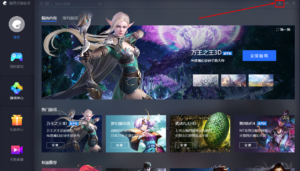
Tencent Gaming Buddy Chinese Language FIx - ItsEasyTech
Tencent Gaming Buddy Chinese Language FIx – ItsEasyTech

Step 3: Click On The Third Option As Marked (Tencent Wasn’t Letting Me To Take Screenshots).


Step 4: Then Click On The Marked Area As Shown In The Picture.
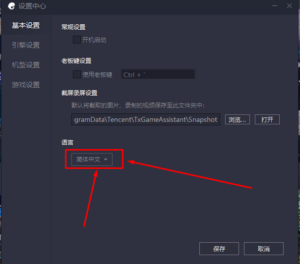
Tencent Gaming Buddy Chinese Language FIx


Step 5: Select English Language From There.
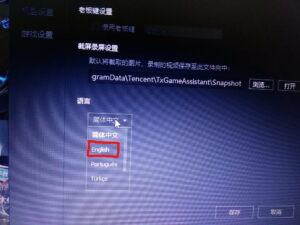
Tencent Gaming Buddy Chinese Language FIx


Step 6: After Selecting English Press On The Marked Place Which Is Ok In Chinese.

Tencent Gaming Buddy Chinese Language FIx


So, This is how you Fix Tencent Gaming Buddy Chinese Language Problem. I hope it had helped you and please comment if you have any problems and don’t forget to contact us.

How to Fix Tencent Gaming Buddy (Gameloop) Lag? | Boost PUBG mobile

Does your Tencent Gaming buddy Lag too? Yeah I know it’s frustrating. Just at the moment when you’re about to win, the game lags or it crashes. Trust me I’ve been there.

So, I’ve brought you some useful tips that you can use to boost pubg mobile. Before we move any further let’s learn what causes the lag in PUBG Mobile?

Lags in PUBG Mobile can be caused by various factors from Low Device Specs to Running background apps. Also, The problem of lag can be due to poor connection of the internet or slow connection ping.

Here are the some steps you can follow to Boost PUBG Mobile:

1. Delete Temporary Files

Temporary files can cause lag to the game. Also, it will use unwanted space and store junk files into the folder.

You can easily access the temp folder by hitting (Window+R) key. Then a run dialog will open up. In the run window type %temp% and hit enter. Now select all the files and delete them.

2. Clear Cache

You can find this option on Tencent Gaming Buddy (Gameloop) Itself. Go to the triple lines icon and you can find a clear cache option there. Click on it and it’s done.
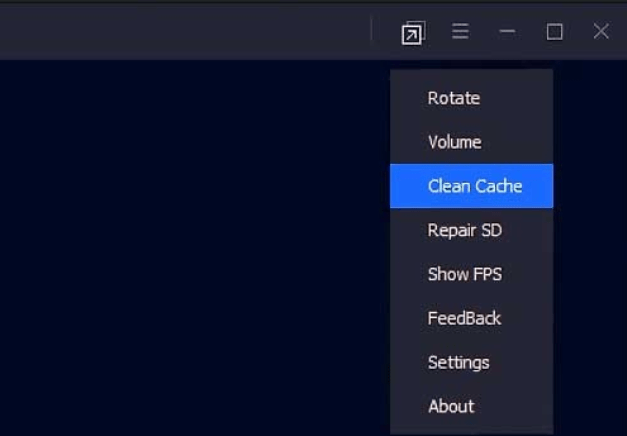
Note: Clearing Cache will also delete your game data. So, You’ll have to log in again and re-download the maps.

3. Change the Priority of Tencent Gaming Buddy in Task Manager

You’ve to change the priority of Tencent Gaming Buddy to “High”. It will help it to gain more CPU resources for the TGB. Which will run games smoother.

All you have to do is Launch TGB and any desired game in it. Then open your Task Manager by pressing “CTRL + SHIFT + ESC” on your keyboard. After that go to the “Details” section tab in Task Manager and search for Tencent Gaming Buddy.

Once you find it, right-click on it and go to “Priority” and change the priority to “High”
Close the Task Manager and play your game. Keep in mind that you’ll have to do it every time you launch a game.

4. Configure Tencent Gaming Buddy Settings

Here are some settings that you can use to configure and boost Tencent Gaming buddy performance. First of all, Choose the Graphics Rendering mode to “DirectX+”. Enable the following settings: Render Cache, Prioritize Dedicated GPU, Rendering Optimization, and Global Render ache.

Now Disable Anti-aliasing mode and Change Memory option to the Maximum range. Also, Set the Processor to the Maximum range. We’re almost done.

Additionally, Change the resolution to default (1024 x 720) and Set the Dot Per Inch to 160. Also, Select the Gaming Resolution to “SD 720P” and Display option to “Smooth”. Now you’re all good to go.

5. Enable “Virtualization Mode” in your System

Virtualization depends on the motherboard or your graphics card specification. It is one of the best ways to increase the performance of your system a lot.

Also, the virtualization option is not available in all the devices. Congratulations if you’re lucky. But How to Check Virtualization mode for your system. Well, it’s simple. Foremost Restart your PC and during Boot, Go to the bios setup.

Now find the processer menu and enable the Virtualization Technology option from the sub-menu. If you did not find any option like this, Sadly your motherboard and the graphics card do not support Virtualization.

6. Update Outdated Drivers

When I updated my device drivers, surprisingly it boosted by Tencent Gaming Buddy performance.

You can also do the same. There are a lot of free software available that can help you to update your drivers to the latest version.

I suggest you use Driver Booster by IObit. It will update your drivers for free and you can again enjoy the game with high performance.

7. Update Tencent Gaming Buddy (Gameloop) To Latest Version

Tencent Gaming Buddy updates its emulator regularly to bring some patch and fixes. You should check if your Tencent Gaming Buddy is up-to-date or not.

If not you should upload it right now. Check for the latest update in the menu panel located at the right of the title menu.

So that’s all about this Tutorial. I hope it helped you to boost your Tencent Gaming buddy and also Fix Its language.

[irp posts=”221″ name=”GTA V Highly Compressed For PC Game Download 2020″]

Similar Posts

What do the llamas in Minecraft Eat
Quick Guide: How To Use Parachute in GTA 5
Pokemon Let’s Go Pikachu Download APK | Without Verification
Share This Article
Facebook Whatsapp Whatsapp Email Print
ByAlex Marz
CEO Of ItsEasyTech - A Real Newbie Learning To Be A Successful Tech Guide. Loves Tech And Gadgets.
Leave a Comment Leave a Comment

Leave a Reply Cancel reply

Your email address will not be published. Required fields are marked *

Read More

What do the llamas in Minecraft Eat
April 14, 2026
How to Get to Undermine in WoW: The War Within Guide
February 11, 2026
WHY THE FIRST 5 YEARS OF RETIREMENT ARE THE MOST DANGEROUS
April 15, 2026
does facebook notify when you save a photo
Does Facebook Notify When You Save a Photo?
April 14, 2026
What do the llamas in minecraft eat
What do the llamas in Minecraft Eat
April 14, 2026
How to block adult content on iPhone
How to Block Adult Content on iPhone in 4 Easy Ways
April 14, 2026
How To

Get Free Chegg Answers | Unblur Chegg Answers

Unbur Chegg Answers For Free

I'll tell you a secret — you can Get Free Chegg answers without paying for a Chegg subscription. Curious How? Let's dive further into this. These days, online studies have become…

Alex Marz
April 11, 2026

Your may also like!

Best AI Video Creation Tools in 2026 for Effortless Content

Best AI Video Creation Tools in 2026 for Effortless Content

Alex Marz
March 19, 2026
iMini vs Sora AI

Is “iMini AI” Better Than Sora? (Honest Review & Best Alternatives)

Alex Marz
January 21, 2026

ChatGPT Search vs. Perplexity vs. Google: The Battle for Best AI Search

Alex Marz
January 16, 2026

Always Stay Up to Date

Subscribe to our Newsletter for Daily Updated Tech Contents!

Find us on Social Media

Facebook Pinterest X-twitter Youtube

© 2026 | ITSEASYTECH.COM. All Rights Reserved.

ItsEasyTech

More from ItsEasyTech

  • About Us
  • Disclamier
  • Privacy & Cookie Policy
  • Terms and Condition
  • Write For Us
Welcome Back!

Sign in to your account

Username or Email Address
Password

Lost your password?