
WRITE FOR US
ItsEasyTech
  • Social Media
    • FacebookFacebook
    • SnapchatSnapchat
    Social Media
    We ItsEasyTech will cover social media guides, tips, and how-tos here. Our content is 100% original and based on in-depth research covering Facebook to TikTok…
    Show More
    Top News
    How to Fix Twitter (X) Links Not Embedding On Discord
    How to Fix Twitter (X) Links Not Embedding On Discord
    February 10, 2024
    Can Someone See if You Search Their Name on Facebook
    Can Someone See if You Search Their Name on Facebook? (The 2026 Myths vs. Reality)
    January 6, 2026
    How To Remove Tag From Facebook Comment
    How To Remove Tag From Facebook Comments
    January 25, 2022
    Latest News
    How to Turn One YouTube Video into 10 TikToks/Shorts with AI
    January 8, 2026
    Can Someone See if You Search Their Name on Facebook? (The 2026 Myths vs. Reality)
    January 6, 2026
    How to Fix “TikTok Photo Mode Not Showing” (2026 Troubleshooting)
    January 6, 2026
    How Gyre Helps You To Grow Your YouTube Channel Automatically
    November 26, 2025
  • How To
    How ToShow More
    Create Viral Faceless TikTok Horror Stories with AI (2026 Guide)
    January 21, 2026
    iMini vs Sora AI
    Is “iMini AI” Better Than Sora? (Honest Review & Best Alternatives)
    January 21, 2026
    ChatGPT Search vs. Perplexity vs. Google: The Battle for Best AI Search
    January 16, 2026
    cYBERSECURITY
    The benefits of using a digital service provider who highlights the importance of cybersecurity
    January 14, 2026
    Best AI Video Creation Tools in 2026 for Effortless Content
    Best AI Video Creation Tools in 2026 for Effortless Content
    January 14, 2026
  • Reviews
    ReviewsShow More
    The Best Adobe Photoshop Alternatives
    The Best Adobe Photoshop Alternatives That Don’t Slow Your PC
    July 30, 2025
    Protect Your Privacy: The Case for Anonymous Hosting 
    December 11, 2024
    Plaud Note Review Is This the Best Voice Recorder
    Plaud Note Review: Is This the Best Voice Recorder?
    July 15, 2024
    Forerunner 165 review
    Forerunner 165 Review: Garmin’S Budget OLED Running Watch
    March 4, 2024
    best ufo movies to watch
    The UFO Movies to Put on Your Must-Watch List Today
    October 30, 2023
  • Tech Updates
    Tech UpdatesShow More
    iMini vs Sora AI
    Is “iMini AI” Better Than Sora? (Honest Review & Best Alternatives)
    January 21, 2026
    Energy infrastructure
    Energy Management as a Core Layer of Industrial Operational Intelligence 
    January 20, 2026
    Giftcard
    7 essential factors to consider before buying a gift card online for a last-minute present
    January 20, 2026
    ChatGPT Search vs. Perplexity vs. Google: The Battle for Best AI Search
    January 16, 2026
    apc ups
    How to Set Up Your APC UPS: What They Don’t Tell You in the Manual?
    January 14, 2026
  • Business
    • Cryptocurrency
    Business
    Get the latest news and insights from the world of digital currencies, and stay informed about the financial markets with our easy-to-use tools.
    Show More
    Top News
    Solana Token Project
    Solana Token Project (SOL) & Future Price Prediction
    February 24, 2023
    Ethereum
    Investing in Ethereum and Profiting from Cryptocurrencies
    May 10, 2023
    Sonic Serenade: Exploring the Power of Music in Sonic Suite
    September 3, 2023
    Latest News
    How to Use ChatGPT to Write SOPs (Plus Free Templates)
    January 8, 2026
    5 Free AI Tools to Remove Watermarks from Images in 2026
    January 7, 2026
    5 AI Agents That Can Automate Your Small Business Invoicing for Free
    January 7, 2026
    Tongits Philippines: Pinatatatag ang Tradisyong Pilipino ng Paglalaro ng Baraha
    January 10, 2026
ItsEasyTechItsEasyTech
Font ResizerAa
Search
Follow US
© Foxiz News Network. Ruby Design Company. All Rights Reserved.
ItsEasyTech > Social Media > Snapchat > How To See How Many Friends You Have on Snapchat
SnapchatSocial Media

How To See How Many Friends You Have on Snapchat

Alex Marz
Last updated: March 10, 2022 5:48 pm
Alex Marz
Share
8 Min Read
How To See How Many Friends You Have on Snapchat
SHARE

Do you want to see How Many Friends You Have on Snapchat?

Snapchat allows you to view your friend list so you can add new friends or unfriend or block someone.

Contents
  • What Does It Mean To Be Snapchat Friends?
  • How To Find and Add Friends on Snapchat
    • 1. Add By Username
    • 2. Add From Address Book
    • 3. Add By Snapcode
    • 4. Add Nearby
    • 5. Share Username
  • Can You See How Many Friends You Have On Snapchat?
  • How To See How Many Friends You Have on Snapchat
    • 1. Open Snapchat App
    • 2. Click on the ‘Map’ icon
    • 3. Navigate to Settings
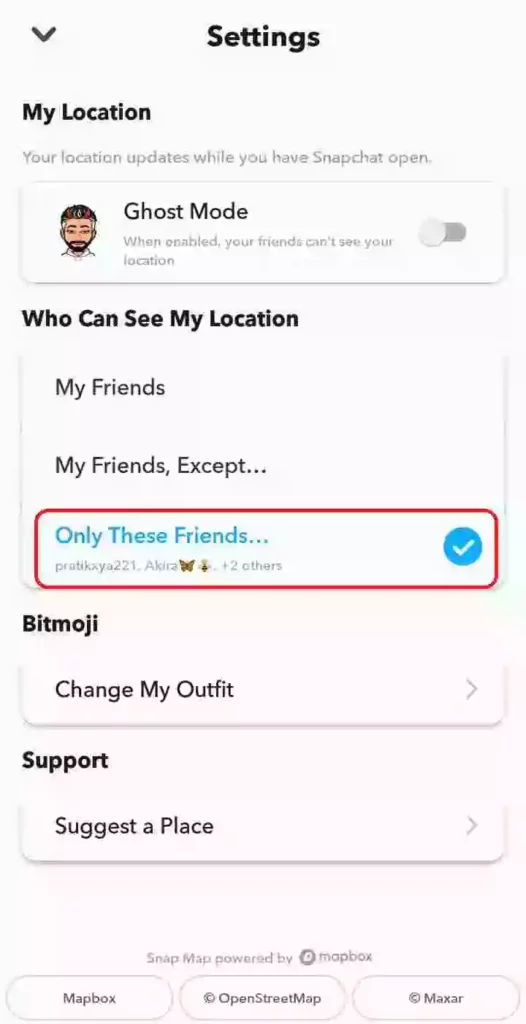
    • 4. Tap on ‘Only These Friends …’
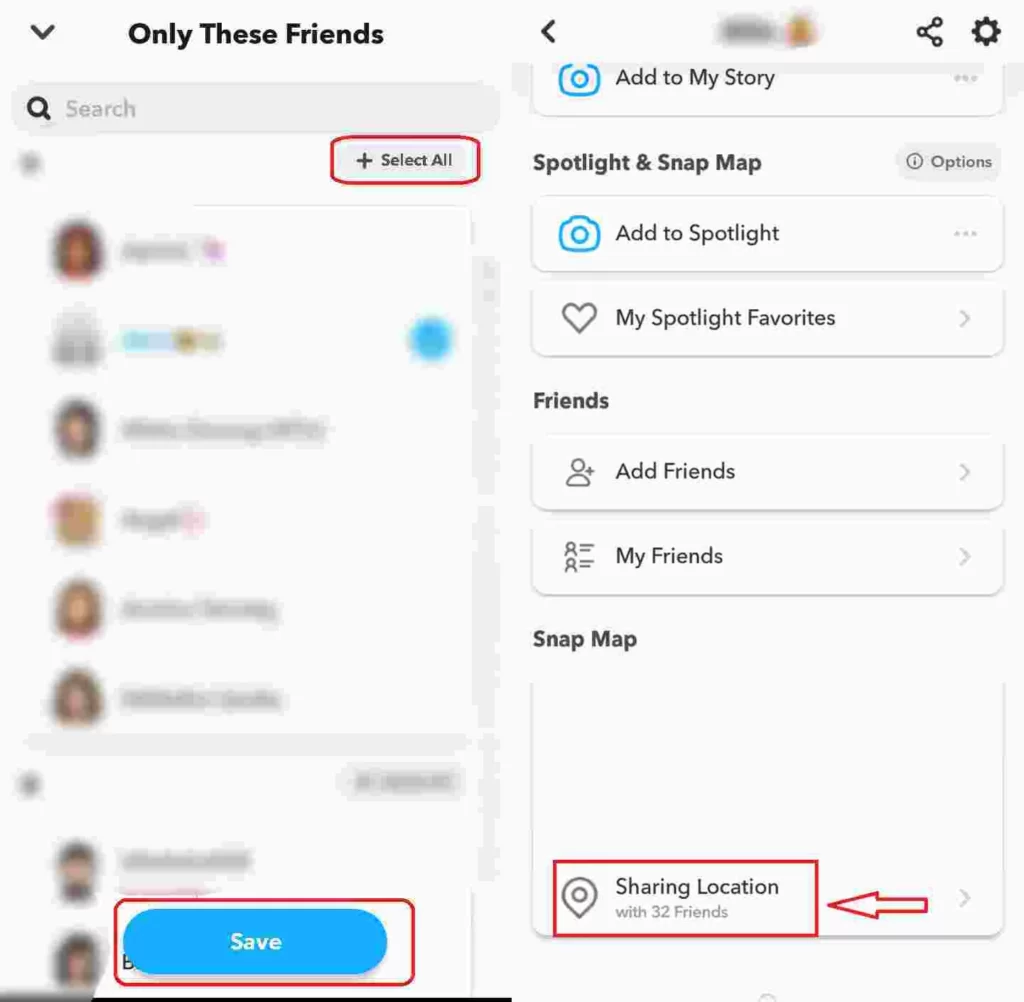
    • 5. Select All and Save
  • How Many Friends Can You Have on Snapchat?
  • Conclusion
  • Further Reading

Snapchat is fun with friends, and you should have a friend to send snaps and build Snapchat streaks with them.

This article will give you an overview of Snapchat friends and how to see your friends on Snapchat.

So let’s begin.

What Does It Mean To Be Snapchat Friends?

You become Snapchat friends when you send or accept someone’s friend request, just like Facebook.

Your Snapchat Friends are actually your Snapchat contacts — people you know and have connected with.

They might be existing contacts who use Snapchat, friends or family you invite to use it, or new contacts who become friends with you.

However, Snapchat Bestfriends is a different case. Snapchat considers a “Best Friend” someone with whom you send the most snaps. Users can have a maximum of eight Best Friends in their contact list.

The friend emoji denotes your relationship with a friend (which, on Snapchat, means how many snaps each of you sends to the other).

Snapchat users spend an average of 30+ minutes on the app every day thanks to this and many other features. They open it more than 25 times per day.

How To Find and Add Friends on Snapchat
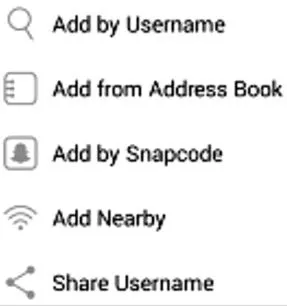
Add friends on Snapchat

You can easily add new friends on Snapchat if you are a new user with no friends.

Snapchat lets you find and add new friends in five different ways.

1. Add By Username

Adding a friend is as simple as entering their corresponding user name.

Put the username of the person you wish to add as a Snapchat friend in the box that says “Username.”

Tap the “+” button beside their user name to add them as a friend.

2. Add From Address Book

The second method is to add Snapchat friends from your saved contact lists.

Tap the “+” icon beside your contact’s name to add them to Snapchat as a friend.

In order to invite them to join Snapchat, you will send them a text message (using either Google Hangouts or the default texting system on your phone) if they do not already have it.

Once they accept, you’ll automatically add them as a friend.

3. Add By Snapcode

You can also add friends on Snapchat by scanning Snapcode.

Using your mobile device, scan photos to see if they contain a “Snapcode.”

A “Snapcode” is an image like a QR code of your profile that reflects Snapchat users.

4. Add Nearby

You can find other people in your local area using Snapchat’s “Add Nearby” feature.

Any available person near your area will appear in the list; tap the ‘+‘ sign beside their name to add them as friends.

5. Share Username

The final way to add friends on Snapchat is to share your username on Social media or other platforms.

You can create and send messages that will display your user name along with a link that they can click on to add you as a friend.

Can You See How Many Friends You Have On Snapchat?

Yes, you can easily see how many friends you have on your Snapchat.

Although Snapchat doesn’t have a direct feature allowing you to see your friends count directly, you can use our trick which we will share below to see how many friends you have on Snapchat.

It’s important not to limit your Snapchat presence to Snapchat since it’s difficult to find you there.

Snapchat is much better with friends sharing stories and trying out funny filters together.

How To See How Many Friends You Have on Snapchat

1. Open Snapchat App
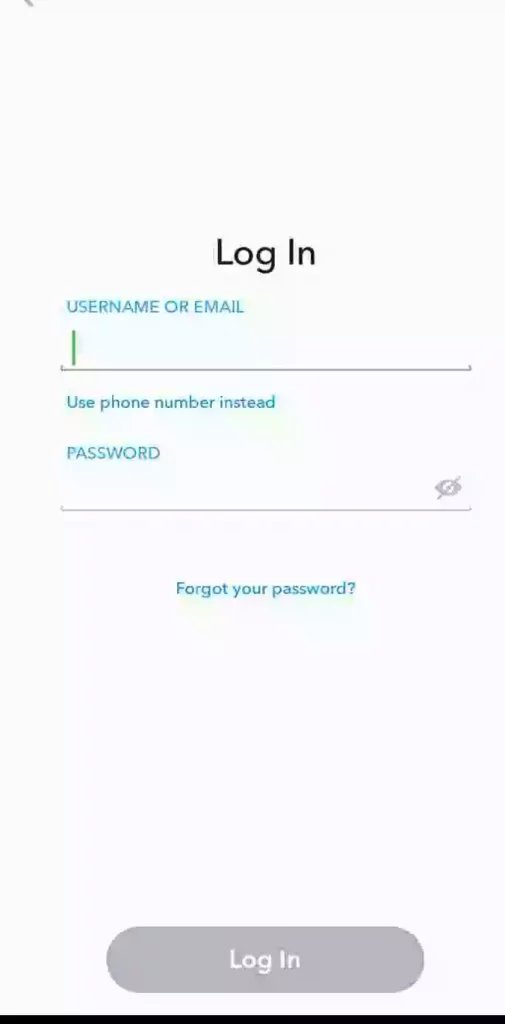
Snapchat Login

The first step is to open your Snapchat app.

If you haven’t logged in then you can log in to your account by entering your credentials.

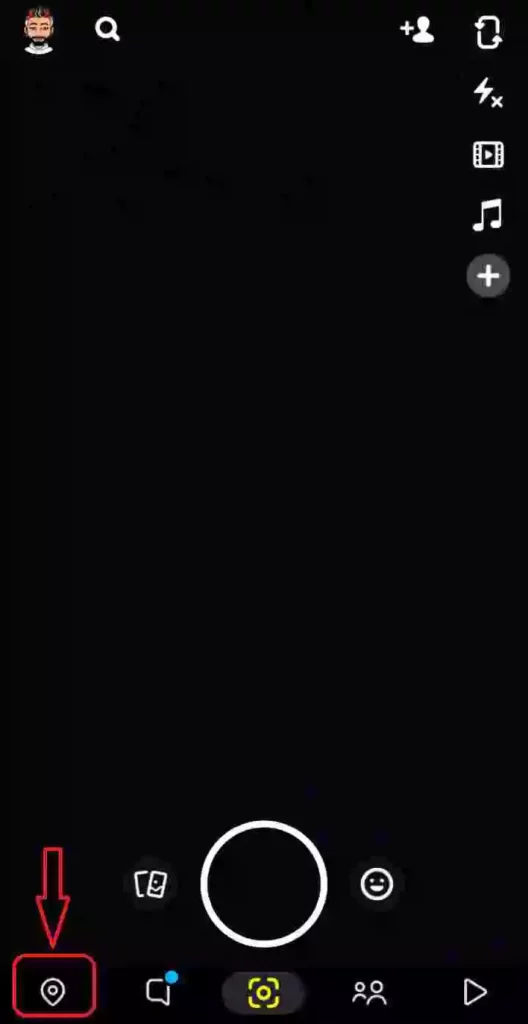
2. Click on the ‘Map’ icon
Snapchat Settings

After you open your Snapchat you’ll see a map icon on the left button on the screen.

Click on the map icon to process to the next step to see your friends on Snapchat.

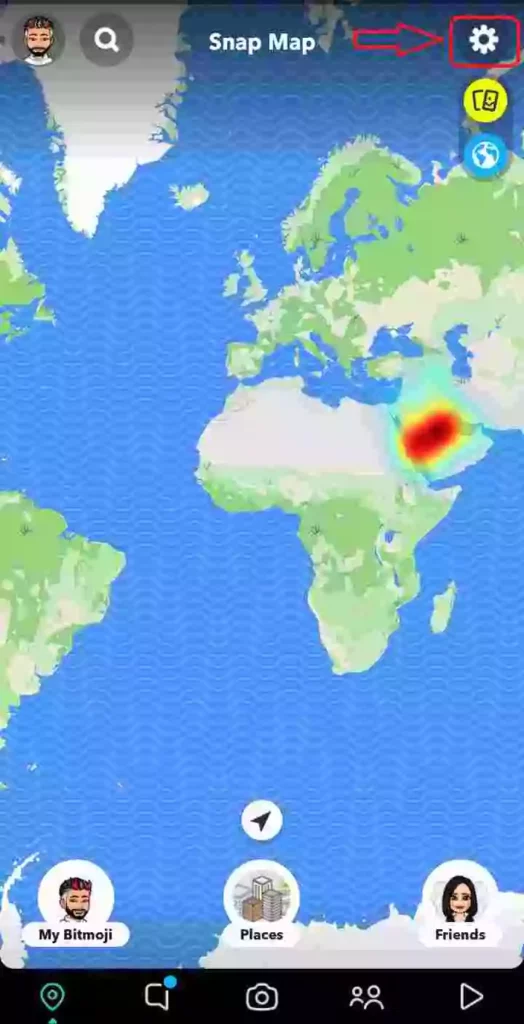
3. Navigate to Settings
Snapchat Maps

After you click on the Map icon you’ll see the location of you and your nearby friends.

Click on the Settings icon on the top right corner.

4. Tap on ‘Only These Friends …’
Only These Friends Snapchat

After you open your settings you’ll see many options.

Tap on ‘Only These Friends …‘ from the menu ‘Who Can See My Location’.

5. Select All and Save
Snapchat sharing location

From the list of your friends, select all and then save.

After you save your settings, you can see how many friends you have on Snapchat.

Go back to SnapMap and look at the number of friends you have on Snapchat.

[jnews_element_embedplaylist layout=”vertical” scheme=”dark” playlist=”https://www.youtube.com/watch?v=Y0iNZoumJfM”]

How Many Friends Can You Have on Snapchat?

There is a limit to the number of friends a user can have on Snapchat.

The previous limit of friends you can have on Snapchat was 2500 friends, but after steadily rising to fame, the social media app upped its limit to 5000 friends.

However, you may be wondering how some people have over 15,000 friends. Well, here’s an answer to it.

 You can still add friends to your account after reaching the Friends limit on Snapchat. 

Furthermore, there is no limitation on how many people can add you to their Friends list.

Conclusion

Snapchat Friends are people who have been added to Snapchat by you (or they have added you).

Snapchat allows you to share Snaps, Stories, and other content with your friends.

You can add Snapchat friends in different ways and block or unfriend them easily.

I hope this article has been a great source for you to learn about Snapchat friends, and now you can see how many friends you have on Snapchat.

At last, If you have any additional questions or suggestions, you can comment below or feel free to contact us.

Further Reading

How To Change Your Streak Emojis on Snapchat

How To Clear Recents on Snapchat

What Does “Other Snapchatters” Mean on Snapchat?

Similar Posts

How to Turn One YouTube Video into 10 TikToks/Shorts with AI
How to Protect Your Privacy on Social Media in 2026
Can Someone See if You Search Their Name on Facebook? (The 2026 Myths vs. Reality)
Share This Article
Facebook Whatsapp Whatsapp Email Print
ByAlex Marz
CEO Of ItsEasyTech - A Real Newbie Learning To Be A Successful Tech Guide. Loves Tech And Gadgets.
Leave a Comment Leave a Comment

Leave a Reply Cancel reply

Your email address will not be published. Required fields are marked *

Read More

Create Viral Faceless TikTok Horror Stories with AI (2026 Guide)
January 21, 2026
Is “iMini AI” Better Than Sora? (Honest Review & Best Alternatives)
January 21, 2026
Energy Management as a Core Layer of Industrial Operational Intelligence 
January 20, 2026

Follow Us on YOuTube

- Advertisement -
Ad image
Tech Updates

7 essential factors to consider before buying a gift card online for a last-minute present

Giftcard

A last-minute present can still feel thoughtful when you pick something people genuinely enjoy using. That is why digital gifting has become a go-to choice for busy shoppers. You can…

Red Eliot
January 20, 2026

Your may also like!

Best AI Video Creation Tools in 2026 for Effortless Content

Best AI Video Creation Tools in 2026 for Effortless Content

Alex Marz
January 14, 2026
10 Weirdest AI Websites

10 Weirdest AI Websites On The Internet 2026

Alex Marz
January 13, 2026
Best websites for No Copyright Sound Effects

7 Best Websites for No Copyright Sound Effects (NCS)

Alex Marz
January 8, 2026

Always Stay Up to Date

Subscribe to our Newsletter for Daily Updated Tech Contents!

Find us on Social Media

Facebook Pinterest X-twitter Instagram Youtube

© 2026 | ITSEASYTECH.COM. All Rights Reserved.

ItsEasyTech

More from ItsEasyTech

  • About Us
  • Disclamier
  • Privacy & Cookie Policy
  • Terms and Condition
  • Write For Us
Welcome Back!

Sign in to your account

Username or Email Address
Password

Lost your password?