

WRITE FOR US
ItsEasyTech
  • Social Media
    • FacebookFacebook
    • SnapchatSnapchat
    Social Media
    We ItsEasyTech will cover social media guides, tips, and how-tos here. Our content is 100% original and based on in-depth research covering Facebook to TikTok…
    Show More
    Top News
    How TO Read Instagram Messages Without Opening DMs
    4 Genius Tricks To Read Instagram Messages Without Opening DMs
    April 11, 2026
    how to buy and recharge tiktok coins
    How To Buy and Recharge TikTok Coins
    January 6, 2026
    Snapchat Snap Score Freeze
    Why Does Snapchat Snap Score Freeze?
    May 2, 2022
    Latest News
    How to Record a WhatsApp Call on Android & iOS
    April 20, 2026
    How to Remove Followers on Twitter (X) Easily
    April 19, 2026
    Does Facebook Notify When You Save a Photo?
    April 14, 2026
    How to See Deleted Messages in Discord (3 Easy Methods)
    February 3, 2026
  • How To
    How ToShow More
    how do you earn pokecoins on pokemon go
    How Do You Earn PokéCoins on Pokémon GO? Easy Guide
    April 25, 2026
    How to create a Man in Infinite Craft
    How To Create a Man in Infinite Craft
    April 23, 2026
    How To Make Smooth Stone Slabs in Minecraft
    How To Make Smooth Stone Slabs in Minecraft
    April 23, 2026
    How to Record a WhatsApp Call on Android & iOS
    How to Record a WhatsApp Call on Android & iOS
    April 20, 2026
    how to remove the followers in twitter X
    How to Remove Followers on Twitter (X) Easily
    April 19, 2026
  • Reviews
    ReviewsShow More
    The Best Adobe Photoshop Alternatives
    The Best Adobe Photoshop Alternatives That Don’t Slow Your PC
    July 30, 2025
    Protect Your Privacy: The Case for Anonymous Hosting 
    December 11, 2024
    Plaud Note Review Is This the Best Voice Recorder
    Plaud Note Review: Is This the Best Voice Recorder?
    July 15, 2024
    Forerunner 165 review
    Forerunner 165 Review: Garmin’S Budget OLED Running Watch
    March 4, 2024
    best ufo movies to watch
    The UFO Movies to Put on Your Must-Watch List Today
    October 30, 2023
  • Tech Updates
    Tech UpdatesShow More
    How EV Route Planner Transforms Operations
    How EV Route Planner Transforms Operations
    April 28, 2026
    5 Best Apple Carplay Apps To Use
    5 Best Apple Carplay Apps To Use in 2026
    April 20, 2026
    Why Commercial Printers Still Matter for Business
    Why Commercial Printers Still Matter for Business
    April 19, 2026
    Why Litho Printing Still Leads Large
    Why Litho Printing Still Leads Large Runs
    April 19, 2026
    What Does JW Mean in Text Messages
    What Does “JW” Mean in Text Messages?
    April 19, 2026
  • Business
    • Cryptocurrency
    Business
    Get the latest news and insights from the world of digital currencies, and stay informed about the financial markets with our easy-to-use tools.
    Show More
    Top News
    Oil Trade Tech
    What Makes Oil Trading The Future Of Money Making?
    January 16, 2023
    Trading
    7 Effective Rules to Follow When Trading Online
    July 13, 2023
    Solana (SOL) Token
    Solana Volume Bot: A Behind-the-Scenes Tool for Token Momentum
    July 15, 2025
    Latest News
    How to Help Your Sales Team Close Deals Faster
    May 9, 2026
    How Leveraging Ba Insight vs Shelfio Enhances Business Efficiency?
    May 6, 2026
    The Ceasefire the Market Did Not See: Why the Polymarket Dispute Could Become a Precedent for the Entire Industry
    April 29, 2026
    Business Owners: Key Considerations for Sharepoint Online Search Connectors
    April 11, 2026
ItsEasyTechItsEasyTech
Font ResizerAa
Search
Follow US
© Foxiz News Network. Ruby Design Company. All Rights Reserved.
ItsEasyTech > Social Media > TikTok > TikTok’s Hidden Permissions: 3 Settings to Change NOW
How ToSocial MediaTikTok

TikTok’s Hidden Permissions: 3 Settings to Change NOW

Alex Marz
Last updated: January 6, 2026 8:05 am
Alex Marz
Share
7 Min Read
TikTok’s Hidden Permissions 3 Settings to Change NOW
SHARE

TikTok is more than just a fun social media platform for sharing videos and experiencing the latest trends. 

From your location to your contact list and even your browsing habits, TikTok has access to many personal information.

Contents
  • Setting #1: Disable Contact & Facebook Sync
  • Setting #2: Limit Ad Personalization & Off-TikTok Tracking
  • Setting #3: Restrict Profile Visibility & Nearby Feed
  • Bonus: Advanced Privacy Tweaks
  • Conclusion

The risks? They’re more real than you might think.

  • Location Tracking: TikTok can follow your every move.
  • Contacts Access: Your connections aren’t just your own anymore.
  • Ad Tracking: Personalized ads based on your behavior.

Not managing your permissions can cause privacy issues, like unwanted targeted ads and sharing data you didn’t want to. It’s important to control your privacy on TikTok by properly managing these permissions!

Setting #1: Disable Contact & Facebook Sync

TikTok aims to connect you with more people, but this is mostly for gathering data. 

When you sync your contacts or Facebook friends, you unknowingly share their information with the app. 

This allows TikTok to access and save details about your friends and family without their permission, raising privacy concerns.
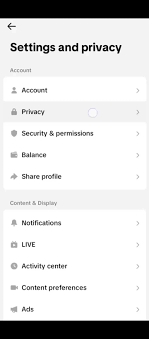
Tiktok settings

The good news is that you can take control and shut this down pretty easily. Here’s how to do it:

  1. Go to Settings in your TikTok app.
  2. Tap on Privacy and find Sync Contacts & Facebook Friends.
  3. Simply Toggle off the options there.

But wait, there’s more! To make sure TikTok doesn’t have a way back to your contacts, you should also revoke its contact access directly from your device settings. Here’s a quick guide:

  • iOS: Go to Settings, then Privacy & Security, choose Contacts, and toggle TikTok off.
  • Android: Go to Settings, then tap on Apps, find TikTok and under Permissions, toggle off Contacts.

By doing this, you’re cutting off TikTok’s direct line to your contacts and those nosy data requests. Way to keep it secure!

Setting #2: Limit Ad Personalization & Off-TikTok Tracking

Believe it or not, TikTok isn’t just about dancing and lip-syncing. This app is a master at figuring out what you like by keeping an eye on your activity—even when you’re not using the app itself. Yes, that means your browsing history and other off-app actions are used to tailor ads specifically for you. If that sounds a little too close for comfort, you’re not alone.

Luckily, you can take steps to minimize this invasive tracking. Follow these instructions to protect your privacy:

  • Go to Settings in your TikTok app.
  • Tap on Ads and look for the option that says Use Off-TikTok Activity for Ad Targeting.
  • Turn it off to prevent TikTok from using your off-app activities to serve you ads.

Additionally, you might want to clear any accumulated data on how your ads are personalized:

  • Under the same Ads section, search for How Your Ads Are Personalized.
  • Go ahead and clear past ad data to ensure TikTok doesn’t have a backlog of your info.

Taking these measures not only reduces how much TikTok knows about what you do online, but it also gives you a bit more control over your digital footprint. And who doesn’t like to keep things a little more private these days?

Setting #3: Restrict Profile Visibility & Nearby Feed

When your TikTok profile is public, or you engage with the Nearby Feed, you’re letting the whole world—or at least the folks around you—peek into your TikTok life. 

This means your videos, interactions, and even personal style could be scrutinized by strangers and local users. It sounds a bit too much like you’re shining a spotlight on your life, doesn’t it?

Fortunately, ensuring your TikTok adventure is both enjoyable and secure is easier than you might think. Here’s what you can do:

  1. Enable Private Account: The first step is switching your profile to private. Go to Settings → Privacy → Private Account. This makes sure that only the people you approve can follow you and view your content.
  2. Disable Posts in Nearby Feed: Next, you might want to limit who sees your posts nearby. Go to Settings → Privacy → Nearby Feed and turn this feature off. This will help keep your content just between you and your chosen followers.
  3. Hide Profile/Post Views: Disable the profiling and tracking of views. This prevents others from seeing if you’ve checked out their profile or posts, keeping your browsing habits to yourself.

Bonus: Advanced Privacy Tweaks

For those willing to go the extra mile, these advanced privacy tweaks will help bolster your security on TikTok:

  • Turn off Location Services: TikTok, like many apps, can use your location to give you a tailored experience. However, this also means precise geo-tracking of your location. Go to Settings → Privacy → Location Services and make sure to turn this switch off. Keeping your location close to the chest ensures that your on-the-go lifestyle isn’t available for everyone to see.
  • Revoke Third-Party App Access: It’s time for an app audit. It can be easy to forget which third-party apps have access to your TikTok data. To take control, go to Settings → Security → Apps & Services and review the list. Remove any apps you no longer use or don’t remember authorizing. It’s like spring cleaning for your digital life!
  • Use a Burner Email/Alias: Lastly, consider using a burner email or alias when signing up for TikTok. This strategy helps shield your personal email from data breaches and marketing lists. Plus, it adds an extra layer of anonymity to your online presence.

By adjusting these settings and taking these additional steps, you can significantly increase your privacy on TikTok. Enjoy sharing and discovering without the unwanted spotlight!

Conclusion

In today’s social media-driven world, it’s important to protect your online privacy.

TikTok, like many apps, has permission settings that might affect your personal data. By changing these three settings, you can protect your privacy and still enjoy TikTok’s creative content.

Regularly checking app permissions helps keep your data safe and helps you understand how your apps work. Be smart and stay secure!


Similar Posts

How Do You Earn PokéCoins on Pokémon GO? Easy Guide
How To Create a Man in Infinite Craft
How To Make Smooth Stone Slabs in Minecraft
Share This Article
Facebook Whatsapp Whatsapp Email Print
ByAlex Marz
CEO Of ItsEasyTech - A Real Newbie Learning To Be A Successful Tech Guide. Loves Tech And Gadgets.
Leave a Comment Leave a Comment

Leave a Reply Cancel reply

Your email address will not be published. Required fields are marked *

Read More

How Do You Earn PokéCoins on Pokémon GO? Easy Guide
April 25, 2026
How To Create a Man in Infinite Craft
April 23, 2026
How to Help Your Sales Team Close Deals Faster
May 9, 2026
Global Business Managementt
How Leveraging Ba Insight vs Shelfio Enhances Business Efficiency?
May 6, 2026
playmarket
The Ceasefire the Market Did Not See: Why the Polymarket Dispute Could Become a Precedent for the Entire Industry
April 29, 2026
How EV Route Planner Transforms Operations
April 28, 2026
CryptocurrencyFinance

Decentralized Cross-Chain Swaps: The Future of Multi-Blockchain Trading

Cross-Chain Swaps

The blockchain world is growing rapidly, but it's also getting more complex with many networks and systems. As people explore various blockchains, the need for these systems to communicate easily…

Red Eliot
April 29, 2026

Your may also like!

Best VPNs to use

6 Best VPNs To Use in 2025 (Features, Pros, Cons)

Express VPN
best RARBG Torrent Alternative Sites

10 Best RARBG Torrent Alternative Sites in 2026

Alex Marz
April 11, 2026
Best AI Video Creation Tools in 2026 for Effortless Content

Best AI Video Creation Tools in 2026 for Effortless Content

Alex Marz
March 19, 2026

Always Stay Up to Date

Subscribe to our Newsletter for Daily Updated Tech Contents!

Find us on Social Media

Facebook Pinterest X-twitter Youtube

© 2026 | ITSEASYTECH.COM. All Rights Reserved.

ItsEasyTech

More from ItsEasyTech

  • About Us
  • Disclamier
  • Privacy & Cookie Policy
  • Terms and Condition
  • Write For Us
Welcome Back!

Sign in to your account

Username or Email Address
Password

Lost your password?




