
WRITE FOR US
ItsEasyTech
  • Social Media
    • FacebookFacebook
    • SnapchatSnapchat
    Social Media
    We ItsEasyTech will cover social media guides, tips, and how-tos here. Our content is 100% original and based on in-depth research covering Facebook to TikTok…
    Show More
    Top News
    How To Stop Youtube video rom pausing
    How To Stop YouTube Video From Pausing
    January 25, 2022
    Learn how you can block and unblock someonne on TikTok
    How To Block Someone on TikTok
    January 6, 2026
    See Mutual QFriends On Snapchat
    How To See Mutual Friends On Snapchat
    March 10, 2022
    Latest News
    How to Record a WhatsApp Call on Android & iOS
    April 20, 2026
    How to Remove Followers on Twitter (X) Easily
    April 19, 2026
    Does Facebook Notify When You Save a Photo?
    April 14, 2026
    How to See Deleted Messages in Discord (3 Easy Methods)
    February 3, 2026
  • How To
    How ToShow More
    how do you earn pokecoins on pokemon go
    How Do You Earn PokéCoins on Pokémon GO? Easy Guide
    April 25, 2026
    How to create a Man in Infinite Craft
    How To Create a Man in Infinite Craft
    April 23, 2026
    How To Make Smooth Stone Slabs in Minecraft
    How To Make Smooth Stone Slabs in Minecraft
    April 23, 2026
    How to Record a WhatsApp Call on Android & iOS
    How to Record a WhatsApp Call on Android & iOS
    April 20, 2026
    how to remove the followers in twitter X
    How to Remove Followers on Twitter (X) Easily
    April 19, 2026
  • Reviews
    ReviewsShow More
    The Best Adobe Photoshop Alternatives
    The Best Adobe Photoshop Alternatives That Don’t Slow Your PC
    July 30, 2025
    Protect Your Privacy: The Case for Anonymous Hosting 
    December 11, 2024
    Plaud Note Review Is This the Best Voice Recorder
    Plaud Note Review: Is This the Best Voice Recorder?
    July 15, 2024
    Forerunner 165 review
    Forerunner 165 Review: Garmin’S Budget OLED Running Watch
    March 4, 2024
    best ufo movies to watch
    The UFO Movies to Put on Your Must-Watch List Today
    October 30, 2023
  • Tech Updates
    Tech UpdatesShow More
    How EV Route Planner Transforms Operations
    How EV Route Planner Transforms Operations
    April 28, 2026
    5 Best Apple Carplay Apps To Use
    5 Best Apple Carplay Apps To Use in 2026
    April 20, 2026
    Why Commercial Printers Still Matter for Business
    Why Commercial Printers Still Matter for Business
    April 19, 2026
    Why Litho Printing Still Leads Large
    Why Litho Printing Still Leads Large Runs
    April 19, 2026
    What Does JW Mean in Text Messages
    What Does “JW” Mean in Text Messages?
    April 19, 2026
  • Business
    • Cryptocurrency
    Business
    Get the latest news and insights from the world of digital currencies, and stay informed about the financial markets with our easy-to-use tools.
    Show More
    Top News
    Bitcoin Trading Risks
    How To Identify & Minimize Bitcoin Trading Risks
    January 17, 2023
    1g Gold Bar
    Should you invest in a 1g gold bar?
    July 5, 2023
    Medical Insurance Myths Indians Should Ignore
    Medical Insurance Myths Indians Should Ignore
    August 19, 2025
    Latest News
    How to Help Your Sales Team Close Deals Faster
    May 9, 2026
    How Leveraging Ba Insight vs Shelfio Enhances Business Efficiency?
    May 6, 2026
    The Ceasefire the Market Did Not See: Why the Polymarket Dispute Could Become a Precedent for the Entire Industry
    April 29, 2026
    Business Owners: Key Considerations for Sharepoint Online Search Connectors
    April 11, 2026
ItsEasyTechItsEasyTech
Font ResizerAa
Search
Follow US
© Foxiz News Network. Ruby Design Company. All Rights Reserved.
ItsEasyTech > Social Media > Snapchat > Why Does Snapchat Snap Score Freeze?
Social MediaSnapchat

Why Does Snapchat Snap Score Freeze?

Alex Marz
Last updated: May 2, 2022 8:58 am
Alex Marz
Share
9 Min Read
Snapchat Snap Score Freeze
SHARE

Has your Snap Score suddenly frozen in Snapchat? 

Snapchat users have reported that their Snap scores are no longer updating for whatever reason. 

Contents
  • What is Snap Score?
  • How To Find Your Snap Score in Snapchat?
  • How to Find Someone Else’s Snapchat Score
  • How to Get Your Snapchat Score Up
  • Why is my Snap Score Frozen?
  • What Can You Do If Your Snap Score is Frozen?
  • Conclusion
  • Further Reading

Seeing their snap score increase is a really great thing for Snapchat users, so it’s very annoying when the latest snap score is not displayed correctly. 

But what is the reason for Snapchat freezing scores in the first place? Could it be an intentional thing, or could it simply be a bug? Here is a quick guide on why someone’s Snap score might freeze and what to do about it.

What is Snap Score?

A Snap Score reflects the level of activity and social engagement that you have on Snapchat. Although it cannot be used for anything, it is fun to see who among your friends is more active on Snapchat. Here are the factors that make up the Snap Score:

– Snaps you have sent or received

– Stories you have viewed or posted

– Discovered videos you’ve watched

– Number of friends you have

As a quick summary, Your Snapchat score serves as an ongoing tally of your activity on the app, such as the number of snaps you sent, snaps you received, users you added, stories you sent, and so on. 

In fact, many Snapchat users compare Snapchat scores as a way of competing against each other or adding trophies to their Snapchat Trophy Cases.

Additionally, you’ll get a bonus if you send snaps to multiple people at once. Also, if you keep up your Snapchat streaks by sending Snaps to your friends, your score will increase.

How To Find Your Snap Score in Snapchat?

In case you have never looked at your Snap Score before, you might begin doing so right now, it’s quite simple.

The first step is to open the Snapchat app and navigate to the Profile screen (tap on your Bitmoji’s face or the circle icon on the top-left corner of the screen).

At the top of your profile you will see your Snap code, and underneath that is your display name, followed by the three pieces of information that will show up: your username, your Snap score, and your zodiac sign.
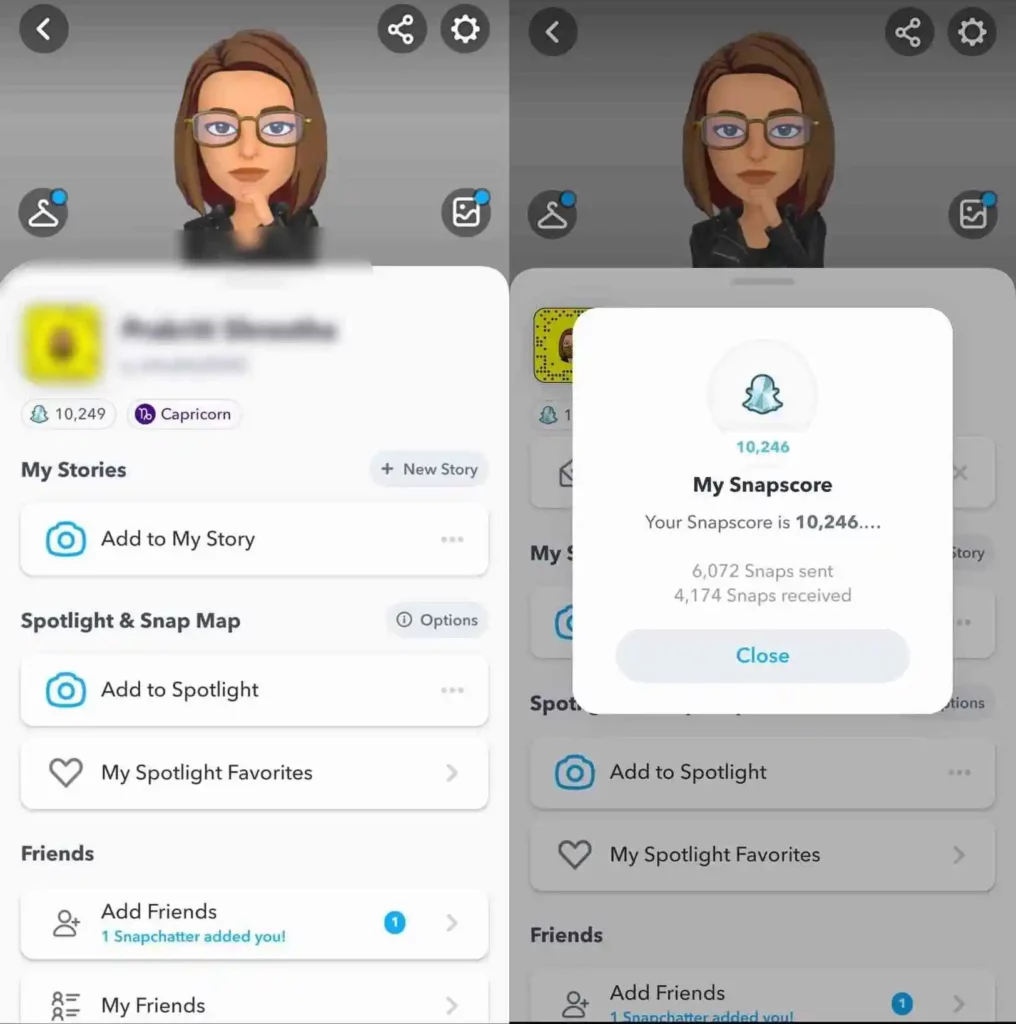
Snapchat Snap score

In this way, you can see your Snap Score along with other additional details related to your Snapchat profile. 

How to Find Someone Else’s Snapchat Score

Are you interested in seeing how your score compares to that of a specific friend or celebrity? While there is no public leaderboard for Snapchat scores, you can check an individual’s score with very little effort.

Tap on a friend’s username to open a chat window. Then, tap on the Bitmoji icon in the top-right corner of the screen to send them a Bitmoji. It will open up a window that has their display name, their Snap score, and their username underneath in small black text.

If you can’t see someone’s Snap score, it’s likely that they have removed you from their friend’s list or that they have blocked you.

How to Get Your Snapchat Score Up

To earn Snap points, you have to use the app frequently and send snaps and interact with people, watch and post stories, and more. 

Your best bet for improving your Snapchat score is to use the app as much as possible. With a bit of dedication, you can reach new heights in no time.

With that being said, it’s important for you to understand some of the common misconceptions about how to increase your Snapchat scores.

Additionally, sending text messages through the Snapchat app does not count toward your Snapchat score. Only video and photo Snaps will have an impact on your Snapchat score.

Why is my Snap Score Frozen?

Don’t panic if you don’t notice a change in your Snap Score right away after exchanging snaps.

There might be a slight delay before Snapchat is able to process your request and update your Snap Score on your profile dashboard.

However, if you do not see any changes to your Snap Score and it seems to be frozen, then the following are some possible reasons for why this might be happening.

1. Delay in Update: Don’t expect changes to happen immediately after exchanging snaps, as I stated above there might be a slight delay and it could take some time until Snapchat notices the changes for your Snap Score and applies them.

2. Slow Internet Connection: There is a possibility that the Snap Score is frozen as a result of your slow internet connection. In some cases, slow internet connections might take some time to reconnect to the Snapchat server before the server detects changes and make changes to your Snap Score.

3. You’re Using an Outdated Version of Snapchat: If you’re using an outdated version of Snapchat, this might be what’s causing your Snapchat Snap Score to freeze. The outdated versions of apps can contain a number of bugs and errors, including vulnerabilities therefore it is suggested to update your app to latest version.

4. Snapchat Server is Down: We have all experienced server down issues even with the most popular social media apps like Facebook, so it is not unusual for Snapchat servers to go down. It is possible for servers to go down for multiple reasons such as maintenance, updating apps, or DDOS attacks, and the only thing you can do it wait for them to become functioning again.

What Can You Do If Your Snap Score is Frozen?

Take a break and don’t worry about losing your score if you take a break. Your Snap score will remain same and can never go down at all. However, if you’ve been using the app regularly but haven’t noticed a change in your Snapchat score, don’t get too worried. Here are a few steps you can take to make sure all your effort doesn’t go to waste:

1. Make sure the version of your app you are using is the most recent one available.

2. Let it go for a few hours-maybe it’s just a glitch or perhaps Snapchat is experiencing technical difficulties at the moment. 

3. Restart your phone and check the score again in the morning.

4. Contact Snapchat support in the event things go south In the worst-case scenario, Snapchat support might be able to assist you in your situation.

Conclusion

Scores on Snapchat can freeze when the server load is high, due to app maintenance and high loads on the server. 

If users want to know the latest status of the Snapchat service, they can check the Snapchat Support Twitter account.

After a few hours, most freeze Snap scores will update itself if you wait.

At last, I hope you understand why Snapchat Snap Score freezes and how you can fix it. if you have any additional questions or suggestions, you can comment below or feel free to contact us.

Further Reading

How To See Mutual Friends On Snapchat

How To Change Your Streak Emojis on Snapchat

What Does “Other Snapchatters” Mean on Snapchat?

Similar Posts

How to Record a WhatsApp Call on Android & iOS
How to Remove Followers on Twitter (X) Easily
Does Facebook Notify When You Save a Photo?
Share This Article
Facebook Whatsapp Whatsapp Email Print
ByAlex Marz
CEO Of ItsEasyTech - A Real Newbie Learning To Be A Successful Tech Guide. Loves Tech And Gadgets.
Leave a Comment Leave a Comment

Leave a Reply Cancel reply

Your email address will not be published. Required fields are marked *

Read More

How Do You Earn PokéCoins on Pokémon GO? Easy Guide
April 25, 2026
How To Create a Man in Infinite Craft
April 23, 2026
How to Help Your Sales Team Close Deals Faster
May 9, 2026
Global Business Managementt
How Leveraging Ba Insight vs Shelfio Enhances Business Efficiency?
May 6, 2026
playmarket
The Ceasefire the Market Did Not See: Why the Polymarket Dispute Could Become a Precedent for the Entire Industry
April 29, 2026
How EV Route Planner Transforms Operations
April 28, 2026
CryptocurrencyFinance

Decentralized Cross-Chain Swaps: The Future of Multi-Blockchain Trading

Cross-Chain Swaps

The blockchain world is growing rapidly, but it's also getting more complex with many networks and systems. As people explore various blockchains, the need for these systems to communicate easily…

Red Eliot
April 29, 2026

Your may also like!

Best VPNs to use

6 Best VPNs To Use in 2025 (Features, Pros, Cons)

Express VPN
best RARBG Torrent Alternative Sites

10 Best RARBG Torrent Alternative Sites in 2026

Alex Marz
April 11, 2026
Best AI Video Creation Tools in 2026 for Effortless Content

Best AI Video Creation Tools in 2026 for Effortless Content

Alex Marz
March 19, 2026

Always Stay Up to Date

Subscribe to our Newsletter for Daily Updated Tech Contents!

Find us on Social Media

Facebook Pinterest X-twitter Youtube

© 2026 | ITSEASYTECH.COM. All Rights Reserved.

ItsEasyTech

More from ItsEasyTech

  • About Us
  • Disclamier
  • Privacy & Cookie Policy
  • Terms and Condition
  • Write For Us
Welcome Back!

Sign in to your account

Username or Email Address
Password

Lost your password?





