
WRITE FOR US
ItsEasyTech
  • Social Media
    • FacebookFacebook
    • SnapchatSnapchat
    Social Media
    We ItsEasyTech will cover social media guides, tips, and how-tos here. Our content is 100% original and based on in-depth research covering Facebook to TikTok…
    Show More
    Top News
    How To Stop Youtube video rom pausing
    How To Stop YouTube Video From Pausing
    January 25, 2022
    Learn how you can block and unblock someonne on TikTok
    How To Block Someone on TikTok
    January 6, 2026
    See Mutual QFriends On Snapchat
    How To See Mutual Friends On Snapchat
    March 10, 2022
    Latest News
    How Social Media Insights Can Transform Your Paid Search Strategy
    May 20, 2026
    How to Record a WhatsApp Call on Android & iOS
    April 20, 2026
    How to Remove Followers on Twitter (X) Easily
    April 19, 2026
    Does Facebook Notify When You Save a Photo?
    April 14, 2026
  • How To
    How ToShow More
    how do you earn pokecoins on pokemon go
    How Do You Earn PokéCoins on Pokémon GO? Easy Guide
    April 25, 2026
    How to create a Man in Infinite Craft
    How To Create a Man in Infinite Craft
    April 23, 2026
    How To Make Smooth Stone Slabs in Minecraft
    How To Make Smooth Stone Slabs in Minecraft
    April 23, 2026
    How to Record a WhatsApp Call on Android & iOS
    How to Record a WhatsApp Call on Android & iOS
    April 20, 2026
    how to remove the followers in twitter X
    How to Remove Followers on Twitter (X) Easily
    April 19, 2026
  • Reviews
    ReviewsShow More
    The Best Adobe Photoshop Alternatives
    The Best Adobe Photoshop Alternatives That Don’t Slow Your PC
    July 30, 2025
    Protect Your Privacy: The Case for Anonymous Hosting 
    December 11, 2024
    Plaud Note Review Is This the Best Voice Recorder
    Plaud Note Review: Is This the Best Voice Recorder?
    July 15, 2024
    Forerunner 165 review
    Forerunner 165 Review: Garmin’S Budget OLED Running Watch
    March 4, 2024
    best ufo movies to watch
    The UFO Movies to Put on Your Must-Watch List Today
    October 30, 2023
  • Tech Updates
    Tech UpdatesShow More
    How Social Media Insights Can Transform Your Paid Search Strategy
    How Social Media Insights Can Transform Your Paid Search Strategy
    May 20, 2026
    Industrial Automation in Modern Beverage Production Plants
    Industrial Automation in Modern Beverage Production Plants
    May 20, 2026
    How to Survive in the Age of Interface Abundance
    A Diet for the Neocortex: How to Survive in the Age of Interface Abundance
    May 18, 2026
    The Best Goal Tracking Apps and Software for Teams
    The Best Goal Tracking Apps and Software for Teams in 2026
    May 16, 2026
    How EV Route Planner Transforms Operations
    How EV Route Planner Transforms Operations
    April 28, 2026
  • Business
    • Cryptocurrency
    Business
    Get the latest news and insights from the world of digital currencies, and stay informed about the financial markets with our easy-to-use tools.
    Show More
    Top News
    Bitcoin Trading Risks
    How To Identify & Minimize Bitcoin Trading Risks
    January 17, 2023
    1g Gold Bar
    Should you invest in a 1g gold bar?
    July 5, 2023
    Medical Insurance Myths Indians Should Ignore
    Medical Insurance Myths Indians Should Ignore
    August 19, 2025
    Latest News
    How Australian Businesses Are Unifying Their Cloud Data Strategies
    May 23, 2026
    A Diet for the Neocortex: How to Survive in the Age of Interface Abundance
    May 18, 2026
    How to Help Your Sales Team Close Deals Faster
    May 9, 2026
    How Leveraging Ba Insight vs Shelfio Enhances Business Efficiency?
    May 6, 2026
ItsEasyTechItsEasyTech
Font ResizerAa
Search
Follow US
© Foxiz News Network. Ruby Design Company. All Rights Reserved.
ItsEasyTech > Social Media > Snapchat > How To Change Your Streak Emojis on Snapchat
Social MediaSnapchat

How To Change Your Streak Emojis on Snapchat

Alex Marz
Last updated: March 10, 2022 5:48 pm
Alex Marz
Share
5 Min Read
How To Change Your Streaks Emoji on Snapchat
SHARE

Are you tired of seeing the same streak emojis on Snapchat?

With all the Streak Emojis options on Snapchat, you might want to spice it up a bit. However, if you are new to Snapchat, you might not know how to change your streak emojis.

Contents
  • What is Streaks on Snapchat and How Does it Works?
  • How To Start a Streaks on Snapchat
    • 1. Add some friends
    • 2. Ask your friends to start a streak
    • 3. Exchange Snaps Regularly
    • 4. Repeat the process daily
  • How To Edit and Change Snapchat Streaks Emoji
  • Conclusion
  • Further Reading

Let us help you out. By the end of this article, you’ll know what Snapchat streaks are and how to change your streaks emojis.

What is Streaks on Snapchat and How Does it Works?

Snapchat streaks are a great way to keep track of your friendships and the number of days you have spent sharing snaps.

In simple words, if you send snaps to your friend for more than one day, then it is considered a streak.

When a person consistently sends a snap to another, that is a streak. As you send snaps every day, your streak will grow.

Snapchat shows a streak next to each contact’s name. The streaks are symbolized by a flame and the number of days they have lasted.

These are visible only to two people who have been involved in the streak.

Snapchat streaks are very popular among its users. In fact, they feel fulfilled when they accumulate more streaks. As such, we hope we have helped you to understand what streaks on Snapchat are.

How To Start a Streaks on Snapchat

Before moving to a topic, remember that you cannot start a streak just by texting on Snapchat.

To start Snapchat Streaks, you both have to send snaps to one another — either photo or video. The more snaps you exchange, the greater your Snapchat streaks will be.

Additionally, you’ll need to follow these steps to start a Snapchat streak.  

1. Add some friends

You’ll have to add some friends who regularly exchange snaps with you to increase your Snapchat streaks. 

As long as you are willing to send each other snaps every day, chances are you won’t lose your streaks.

2. Ask your friends to start a streak

You can post a story or Direct message your friends, asking them to start a streak with you. 

Also, be sure that you both stay committed by exchanging snaps with each other to avoid losing your streaks. 

3. Exchange Snaps Regularly

Your snaps can either be photos or videos. If you don’t know what to send, you can send Good Morning snaps, Goodnight snaps, or random snaps.

Snapchat streaks are a great indication of your friendship and commitment toward one another. 

4. Repeat the process daily

You’ll have to exchange snaps daily to increase and maintain your streaks.

The more days you go exchanging snaps, the more your Snapchat streaks will increase. 

How To Edit and Change Snapchat Streaks Emoji

For the Snapchat streak emoji to appear on your chats, you and your friend must send snaps to each other for more than three consecutive days.

Now let’s move to the fun part and learn how to edit and change streaks on Snapchat.

  1. Launch Snapchat App On Your Phone.
  2. Select Your Avatar on Top Left Corner.
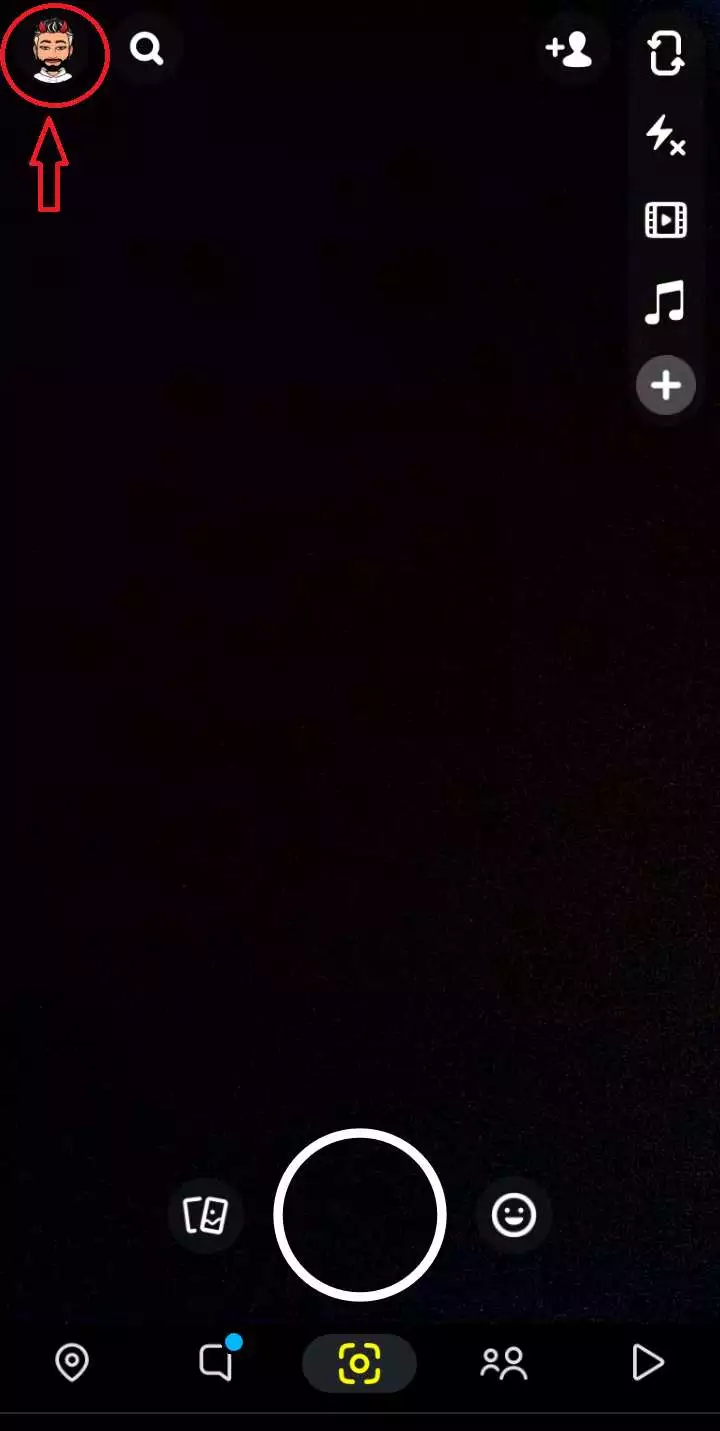
    Snapchat Profile
  3. Now again select “Settings” icon on Top right corner.
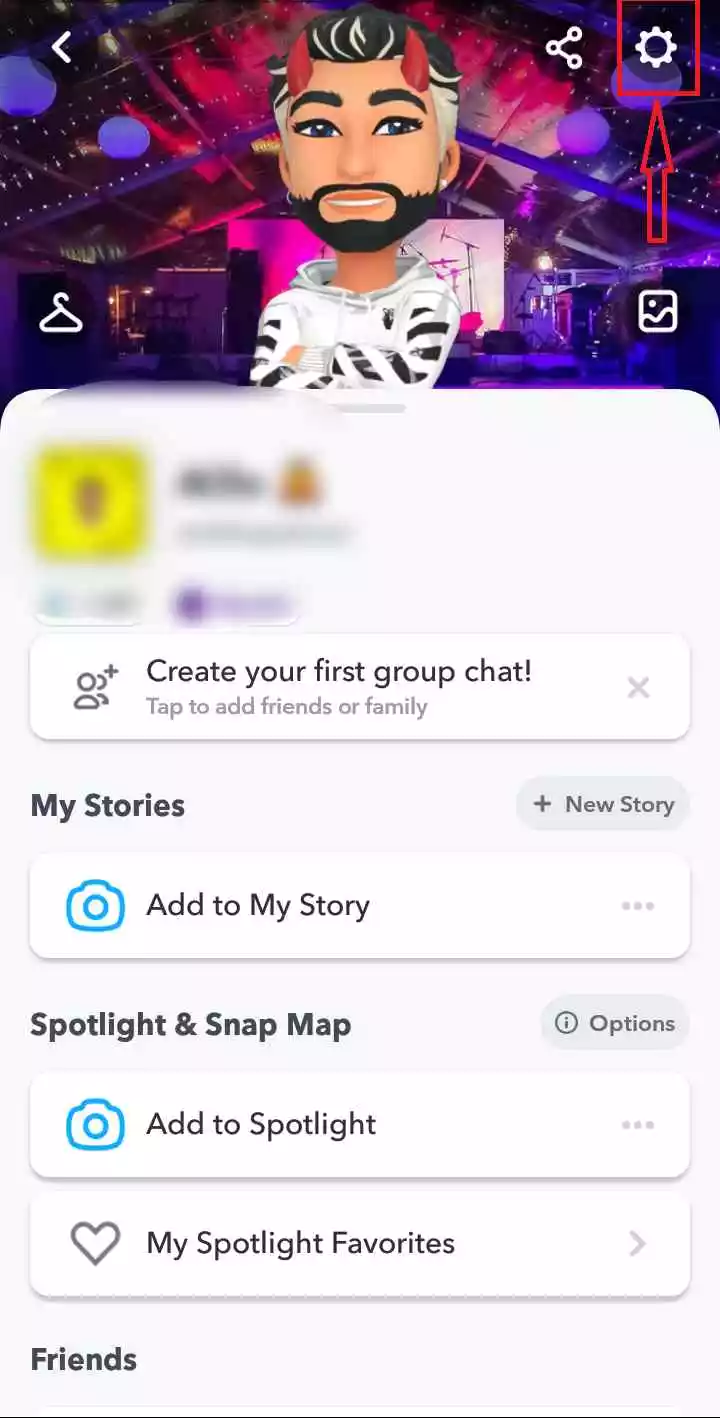
    Snapchat Streaks Emoji change
  4. Scroll down a bit and then choose “Customize Emojis.”
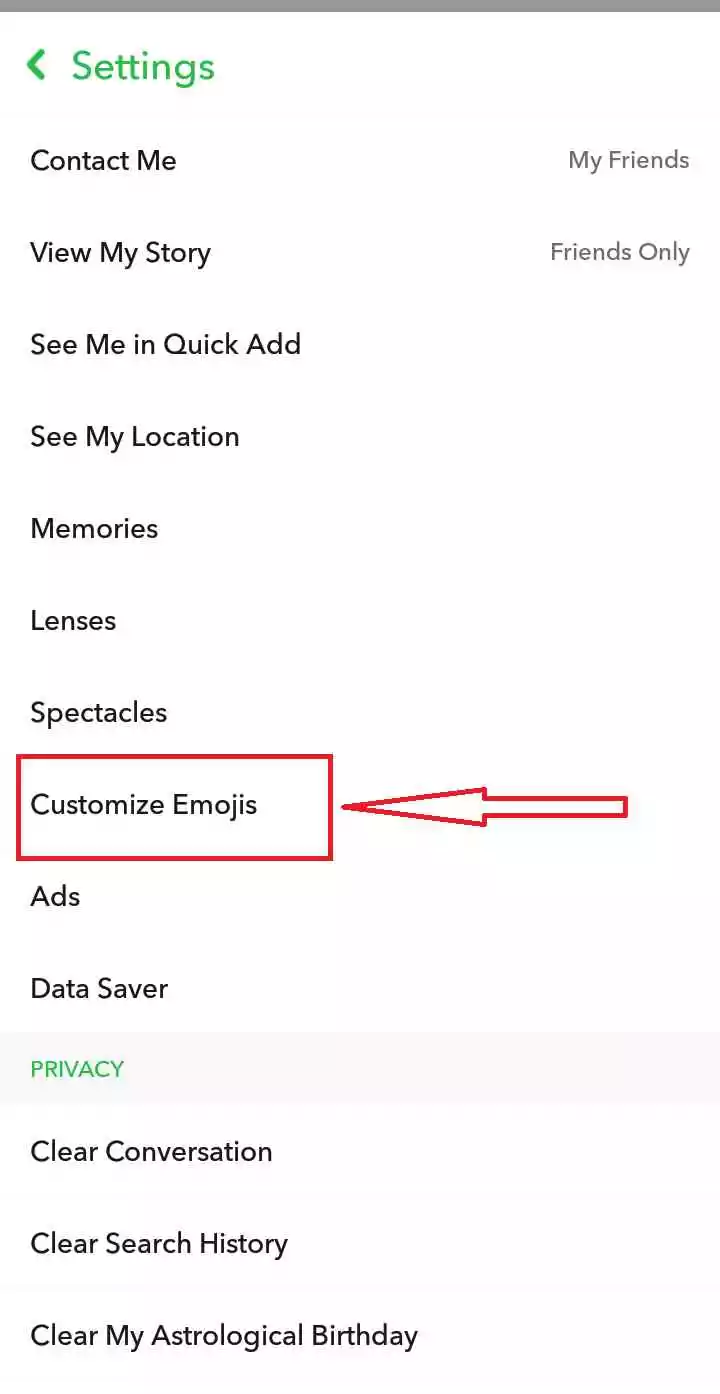
    Change Streaks Emoji Snapchat
  5. Scroll down a bit again and select “Snapstreak!“
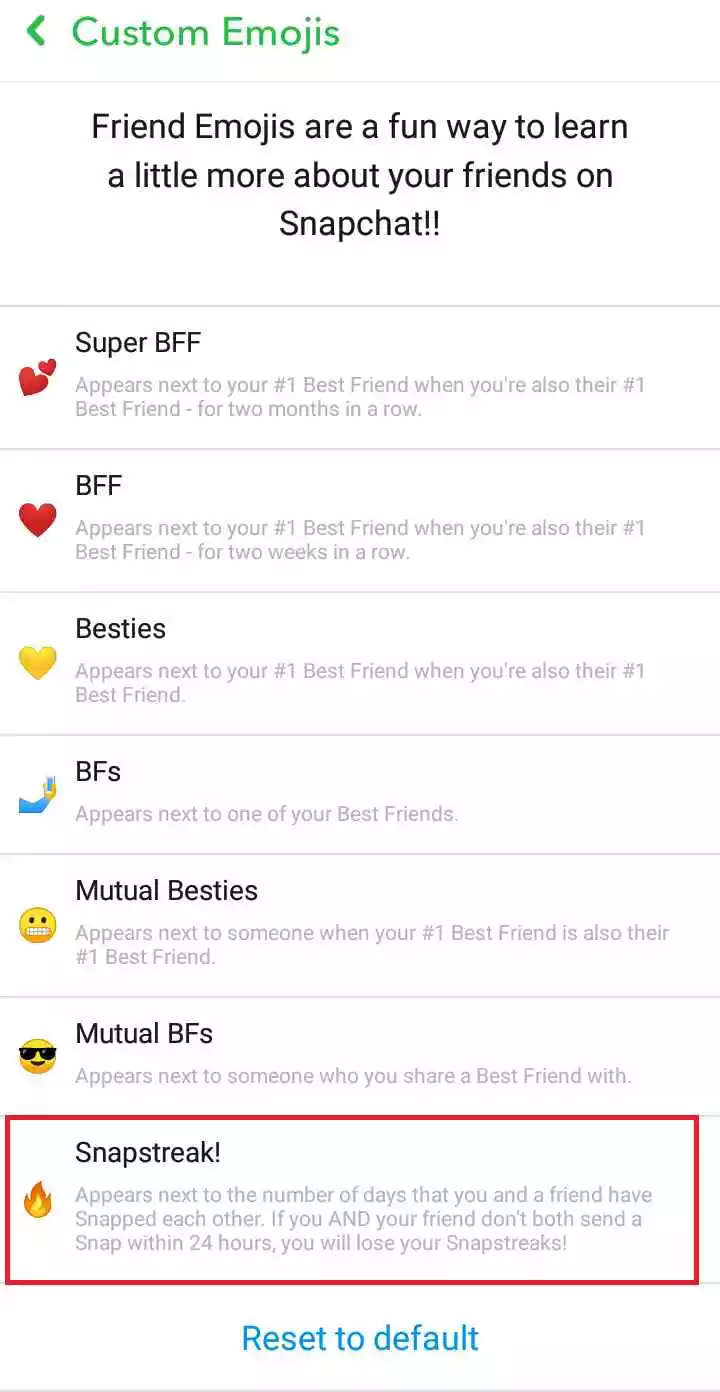
    Snapchat Streaks Customize Emoji
  6. You can pick any streak emojis you prefer.
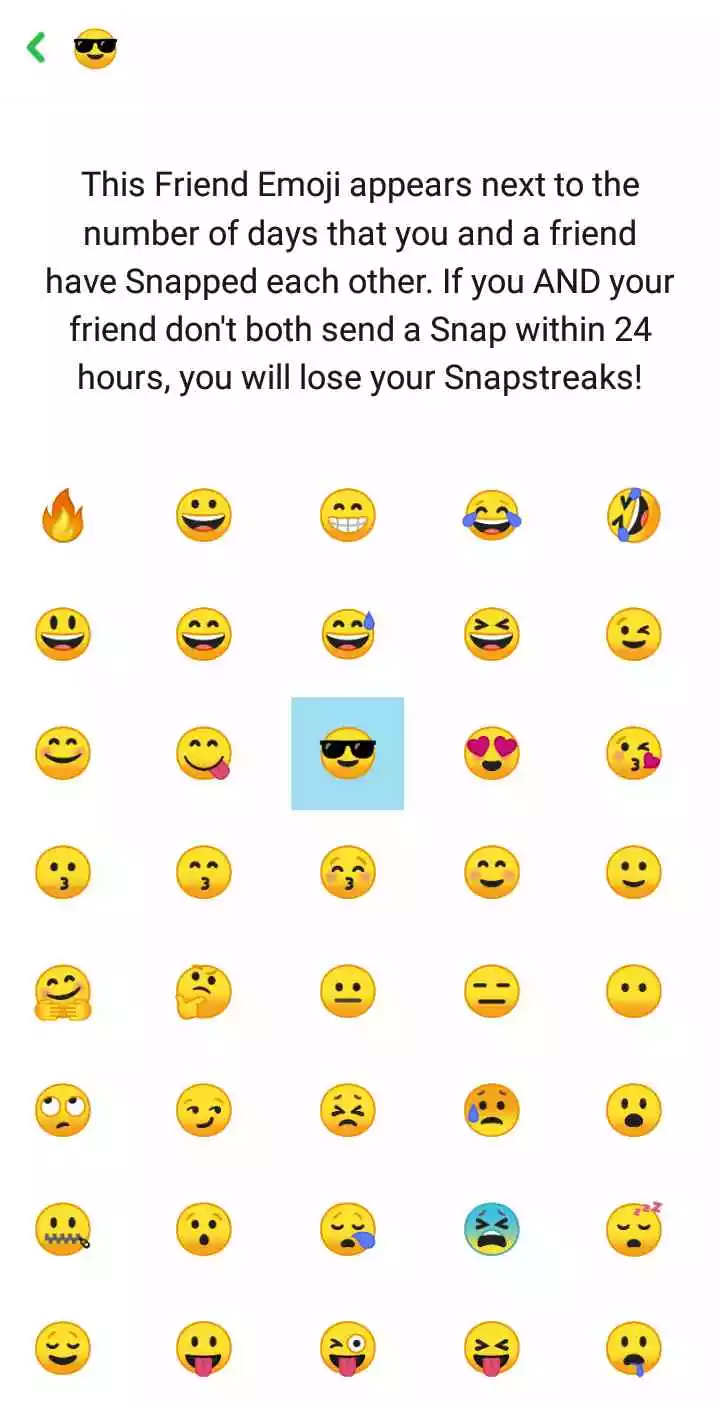
    Change Snapchat Streak Emojis With Friend
  7. You’ve changed your Snapchat streak emojis.

[jnews_element_embedplaylist layout=”vertical” scheme=”dark” playlist=”https://www.youtube.com/watch?&v=D4X7z8-e-3w”]

Conclusion

The idea of a long Snapstreak is actually quite achievable if both Snappers are committed.

To get back on track, all you have to do is send another Snap of literally anything before the time runs out.

Now since you can change your streak emojis on Snapchat, you can start snapping your friends right now.

If you have any additional questions or suggestions, you can comment below or feel free to contact us.


Further Reading

How To Clear Recents on Snapchat

What Does “Other Snapchatters” Mean on Snapchat?

Similar Posts

How Social Media Insights Can Transform Your Paid Search Strategy
How to Record a WhatsApp Call on Android & iOS
How to Remove Followers on Twitter (X) Easily
Share This Article
Facebook Whatsapp Whatsapp Email Print
ByAlex Marz
CEO Of ItsEasyTech - A Real Newbie Learning To Be A Successful Tech Guide. Loves Tech And Gadgets.

Read More

How Do You Earn PokéCoins on Pokémon GO? Easy Guide
April 25, 2026
How To Create a Man in Infinite Craft
April 23, 2026
How Australian Businesses Are Unifying Their Cloud Data Strategies
May 23, 2026
How Social Media Insights Can Transform Your Paid Search Strategy
May 20, 2026
Industrial Automation in Modern Beverage Production Plants
May 20, 2026
How to Survive in the Age of Interface Abundance
A Diet for the Neocortex: How to Survive in the Age of Interface Abundance
May 18, 2026
Best OfTech Updates

The Best Goal Tracking Apps and Software for Teams in 2026

The Best Goal Tracking Apps and Software for Teams

Setting goals is the easy part. Most teams do it at the start of every quarter with genuine intention — a planning session, a shared doc, a slide at the…

Alex Marz
May 16, 2026

Your may also like!

5 Best Apple Carplay Apps To Use

5 Best Apple Carplay Apps To Use in 2026

Alex Marz
April 20, 2026
Best VPNs to use

6 Best VPNs To Use in 2025 (Features, Pros, Cons)

Express VPN
best RARBG Torrent Alternative Sites

10 Best RARBG Torrent Alternative Sites in 2026

Alex Marz
April 11, 2026

Always Stay Up to Date

Subscribe to our Newsletter for Daily Updated Tech Contents!

Find us on Social Media

Facebook Pinterest X-twitter Youtube

© 2026 | ITSEASYTECH.COM. All Rights Reserved.

ItsEasyTech

More from ItsEasyTech

  • About Us
  • Disclamier
  • Privacy & Cookie Policy
  • Terms and Condition
  • Write For Us
Welcome Back!

Sign in to your account

Username or Email Address
Password

Lost your password?