
WRITE FOR US
ItsEasyTech
  • Social Media
    • FacebookFacebook
    • SnapchatSnapchat
    Social Media
    We ItsEasyTech will cover social media guides, tips, and how-tos here. Our content is 100% original and based on in-depth research covering Facebook to TikTok…
    Show More
    Top News
    How to Fix Facebook Messenger Not Sending Photos
    How To Fix Facebook Messenger Not Sending Photos
    January 28, 2025
    How Social Media Insights Can Transform Your Paid Search Strategy
    How Social Media Insights Can Transform Your Paid Search Strategy
    May 20, 2026
    What Does Other Snapchatters Mean on Snapchat
    What Does “Other Snapchatters” Mean on Snapchat?
    April 11, 2026
    Latest News
    How to Record a WhatsApp Call on Android
    June 1, 2026
    How Social Media Insights Can Transform Your Paid Search Strategy
    May 20, 2026
    How to Record a WhatsApp Call on Android & iOS
    April 20, 2026
    How to Remove Followers on Twitter (X) Easily
    April 19, 2026
  • How To
    How ToShow More
    How to Record a WhatsApp Call on Android & iPhone
    How to Record a WhatsApp Call on Android
    June 1, 2026
    How to Find Biomes in Minecraft (Easy Guide)
    How to Find Biomes in Minecraft (Easy Guide)
    June 1, 2026
    how to enable screen recording on iPhone easily
    How to Enable Screen Recording on iPhone (Quick Guide)
    June 1, 2026
    best ways to improve brand visibility in ai search results
    How to Improve Brand Visibility in AI Search Results
    June 1, 2026
    how do you earn pokecoins on pokemon go
    How Do You Earn PokéCoins on Pokémon GO? Easy Guide
    April 25, 2026
  • Reviews
    ReviewsShow More
    The Best Adobe Photoshop Alternatives
    The Best Adobe Photoshop Alternatives That Don’t Slow Your PC
    July 30, 2025
    Protect Your Privacy: The Case for Anonymous Hosting 
    December 11, 2024
    Plaud Note Review Is This the Best Voice Recorder
    Plaud Note Review: Is This the Best Voice Recorder?
    July 15, 2024
    Forerunner 165 review
    Forerunner 165 Review: Garmin’S Budget OLED Running Watch
    March 4, 2024
    best ufo movies to watch
    The UFO Movies to Put on Your Must-Watch List Today
    October 30, 2023
  • Tech Updates
    Tech UpdatesShow More
    how to enable screen recording on iPhone easily
    How to Enable Screen Recording on iPhone (Quick Guide)
    June 1, 2026
    best ways to improve brand visibility in ai search results
    How to Improve Brand Visibility in AI Search Results
    June 1, 2026
    Top Skills Every Educational Leader Needs in Today’s Schools
    Top Skills Every Educational Leader Needs in Today’s Schools
    May 31, 2026
    How Social Media Insights Can Transform Your Paid Search Strategy
    How Social Media Insights Can Transform Your Paid Search Strategy
    May 20, 2026
    Industrial Automation in Modern Beverage Production Plants
    Industrial Automation in Modern Beverage Production Plants
    May 20, 2026
  • Business
    • Cryptocurrency
    Business
    Get the latest news and insights from the world of digital currencies, and stay informed about the financial markets with our easy-to-use tools.
    Show More
    Top News
    esports betting
    The Rise of Esports Betting: What You Need to Know
    March 26, 2025
    quantam ai trading
    The Potential of Quantum AI in Modern Trading Strategies
    February 11, 2025
    Top Skills Every Educational Leader Needs in Today’s Schools
    Top Skills Every Educational Leader Needs in Today’s Schools
    May 31, 2026
    Latest News
    Top Skills Every Educational Leader Needs in Today’s Schools
    May 31, 2026
    How Australian Businesses Are Unifying Their Cloud Data Strategies
    May 23, 2026
    A Diet for the Neocortex: How to Survive in the Age of Interface Abundance
    May 18, 2026
    How to Help Your Sales Team Close Deals Faster
    May 9, 2026
ItsEasyTechItsEasyTech
Font ResizerAa
Search
Follow US
© Foxiz News Network. Ruby Design Company. All Rights Reserved.
ItsEasyTech > Social Media > TikTok > TikTok NSFW: How To Watch NSFW Content on TikTok
Social MediaTikTok

TikTok NSFW: How To Watch NSFW Content on TikTok

Alex Marz
Last updated: January 6, 2026 8:06 am
Alex Marz
Share
8 Min Read
How To Watch NSFW Contents on TikTok
SHARE

Do you want to watch NSFW content on TikTok?

If so, we can guide you on how to watch NSFW content on TikTok.

Contents
  • What is TikTok NSFW?
  • Does TikTok Have 18+ NSFW Content?
  • How To Watch NSFW Content on TikTok
    • 1. Login To Your TikTok Account
    • 2. Navigate to Search Box
    • 3. Type “#nsfw” in the Search Box
    • 4. Watch NSFW Videos
  • How To Disable NSFW Content on TikTok
    • 1. Launch TikTok App
    • 2. Navigate to the “Profile” section
    • 3. Click on Three Dots & Select “Privacy & Settings”.
    • 4. Tap on “Digital wellbeing”
    • 5. Go To Restricted Mode & Enable it
    • 6. Enter Passcode & Confirm It
    • 7. Restricted Mode is Enabled
  • Conclusion
  • Further Reading

But first, does TikTok allow NSFW content? What are the TikTok Guidelines about sexual content on TikTok? & How can you Save TikTok NSFW Content without Watermark?

We are here to answer all of your questions, so don’t worry.

By the end of this article, you will learn all about TikTok NSFW content.

Let’s start with the basics!

  • What is TikTok NSFW?
  • Does TikTok Have 18+ NSFW Content?
  • How To Watch NSFW Content on TikTok
  • How To Disable NSFW Content on TikTok

Related: Can You Screenshot on OnlyFans?

What is TikTok NSFW?

TikTok NSFW is an adult internet content that is not appropriate to view

The NSFW acronym stands for “not safe for work“.

If the content has an NSFW tag, you should avoid looking at it on a work computer or other people around.

NSFW tags were first associated with warnings about sexual content, nudity, and violence, but they have evolved to include all kinds of sensitive and potentially triggering content.

Nowadays, the term NSFW is often applied to any link or image, even one that is contextually innocent — that could raise eyebrows. For example, a page about a dog pooping on the floor.

Also Read: How To Find Someone on OnlyFans Easily

Does TikTok Have 18+ NSFW Content?

No, TikTok doesn’t have or allow 18+ Sexual NSFW Content.

TikTok automatically deletes all NSFW content, whether it exposes private body parts, gores, or explicit content.

While some 18+ videos may pass through the algorithm, they will eventually be deleted.

The TikTok spokeswoman stated that the app prohibits nudity and sexual solicitation and accounts that redirect users to sexual content and services, including on OnlyFans.

As stated in TikTok’s community guidelines, it is clearly said that any content that simulates sexual activity with another user, whether verbally, in-text (including emojis), or through an in-app feature, is not allowed.

How To Watch NSFW Content on TikTok

What remains is to find out how to watch NSFW content.

While TikTok does not allow sexually explicit content, it does have a large number of NSFW videos.

However, these contents may include funny videos, memes, or disturbing videos, so heed warnings.

Here’s how to watch NSFW content on TikTok.

1. Login To Your TikTok Account

The first step is to log in to your TikTok account.

If you’re using a mobile device, launch the app and log in with your account.

Alternatively, if you are using a desktop, go to https://tiktok.com and log in to your TikTok account.

2. Navigate to Search Box

TikTok nsfw Search

After you log in to your account, navigate to the search box.

It is usually found in the top-left hand corner of mobile devices

PC users can locate the search option on the top-center side of the TikTok homepage.

3. Type “#nsfw” in the Search Box
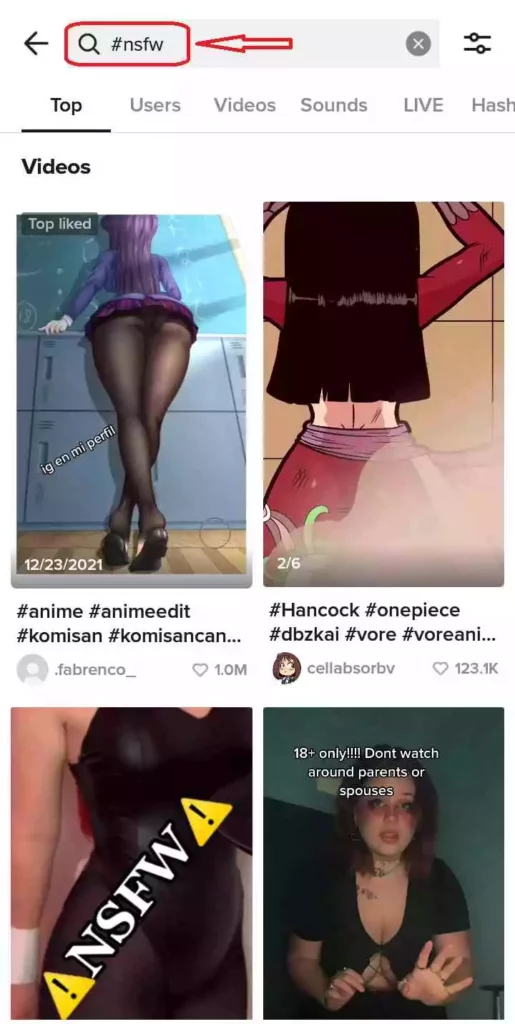
TikTok NSFW Content

After you navigate to the search box, the next step is to type “#nsfw” in the search box.

After typing hit search then TikTok will load NSFW content for you.

4. Watch NSFW Videos

When you type “#nsfw” into the search box, you will automatically see TikTok’s NSFW content.

You can now choose your favorite video and seamlessly enjoy NSFW content on TikTok.

How To Disable NSFW Content on TikTok

Users of TikTok can enable a Restricted Mode, which automatically filters content NSFW & inappropriate content on TikTok.

TikTok introduced a ‘restricted mode‘ to protect its young users against certain types of content on the app.

As they explain on their website: “Restricted Mode is an option at the account settings level that restricts the appearance of content that may not be appropriate for all audiences.”. However, you can Free Download for NSFW Content On Desktop & Android.

Let’s see how you can disable NSFW content content on TikTok.

1. Launch TikTok App

Initially, you must launch the application to enable restricted mode. You can open TikTok directly from your app drawer by searching for the music note icon.

Once you find the icon, simply tap it once to open it.

2. Navigate to the “Profile” section
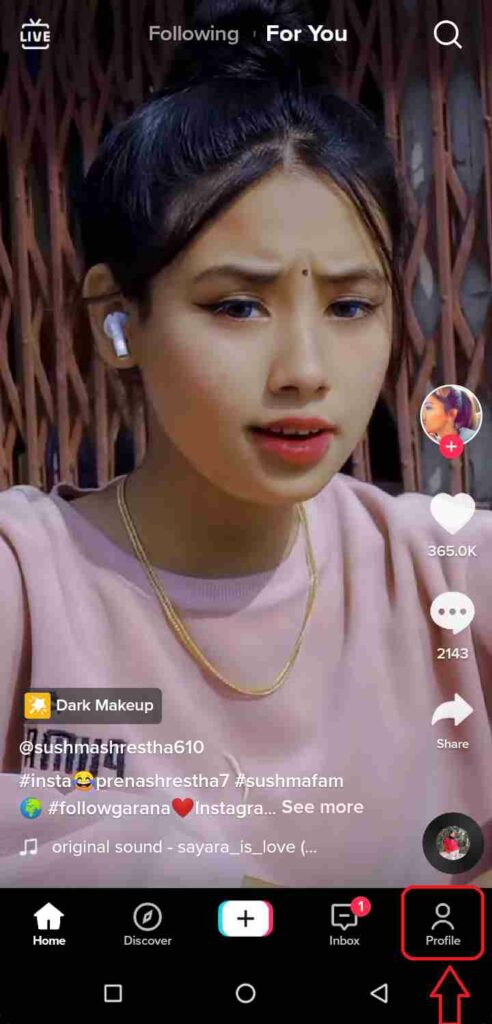
TikTok Profile Account

When you open TikTok, the feed section will appear automatically.

You can tap on the person icon next to the feed feature to go to the profile section.

3. Click on Three Dots & Select “Privacy & Settings”.
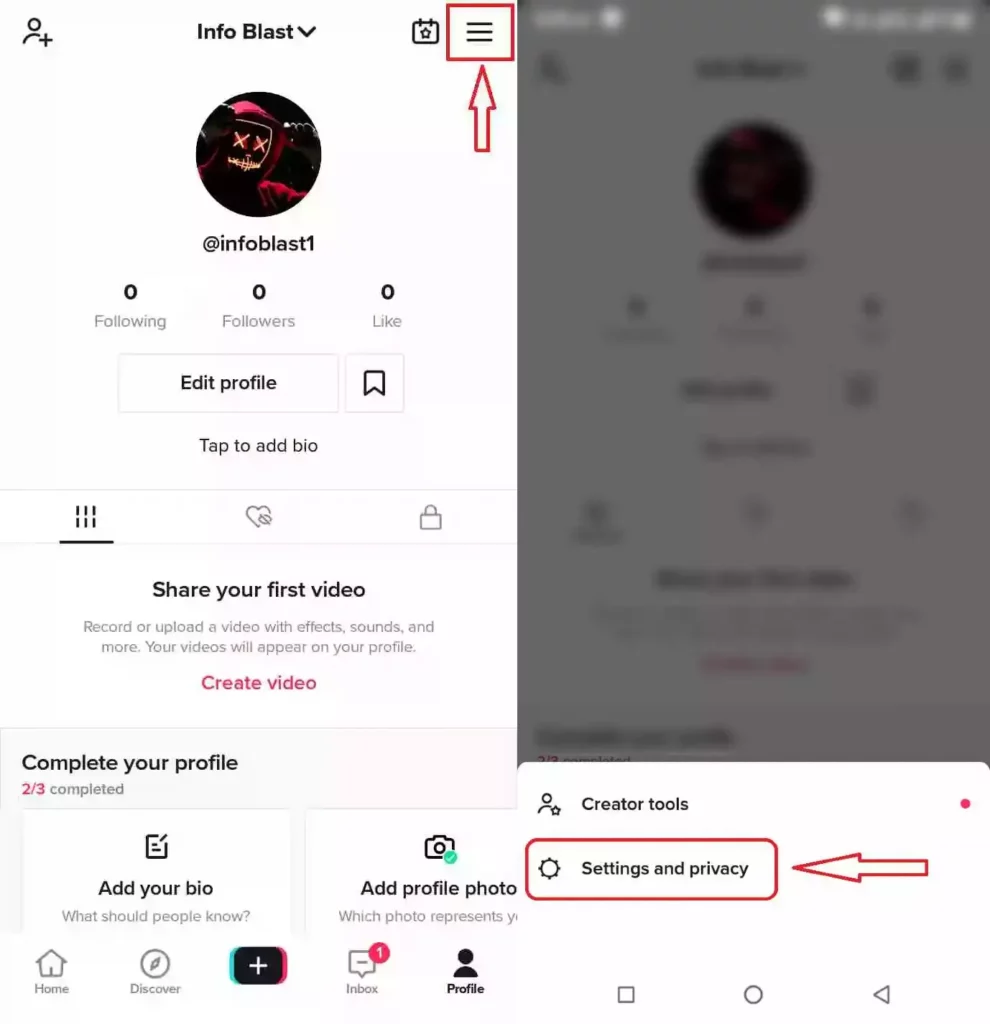
On your profile page, click the three dots in the top right corner.

After selecting three dots, scroll down and choose privacy and settings.

4. Tap on “Digital wellbeing”

As shown below, there are many privacy settings available to you in the privacy and settings area. 

Tap on “Digital wellbeing” once you’ve discovered it. 

You can find it under the sub-section “General” in Privacy and settings.

5. Go To Restricted Mode & Enable it
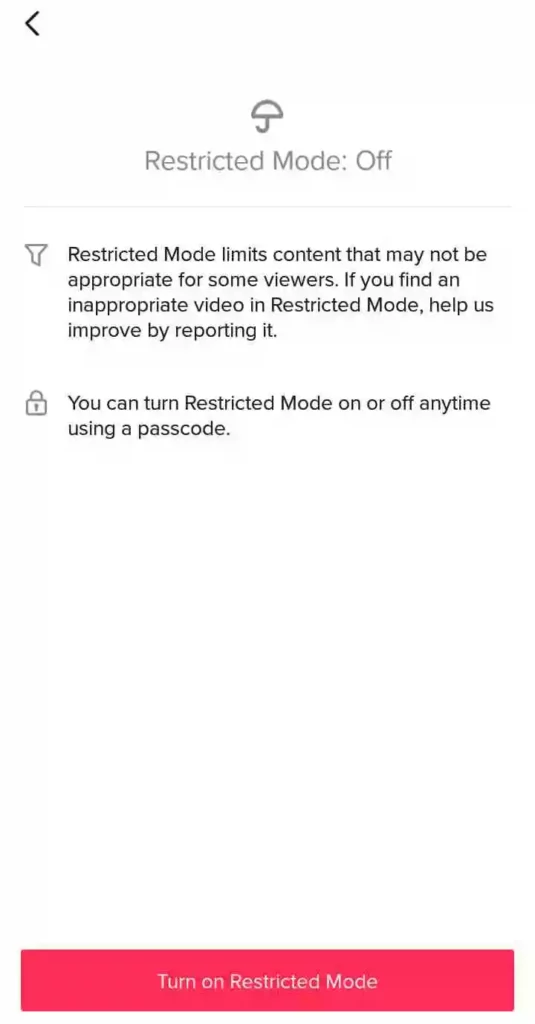
Restrict Mode TikTok

Now you’ll be given two options, as shown on the image below. 

There is even a visible indicator that your restricted mode is off. To switch it on, tap Restricted Mode.

After you tap on Restricted Mode, click on Enable Restricted Mode.  

6. Enter Passcode & Confirm It

You will be prompted with the Set Password option when you click Enable Restricted Mode.

Without a passcode, Restricted Mode can’t be enabled on TikTok.

Enter your desired passcode and confirm it by re-entering it to set a passcode.

Then click the Next button.

7. Restricted Mode is Enabled

You have now enabled restricted mode after creating your passcode. 

When you complete all the above steps, your TikTok account will be in Restricted mode. 

To check if it is enabled, go to your feed. 

You’ll see a message at the top of the screen with Restricted Mode. 

As a result, you have enabled restricted mode on TikTok, and NSFW contents are filtered on TikTok automatically. 

Conclusion

There is a wide selection of sound effects and song snippets in the TikTok app and the option of adding special effects and filters.

On TikTok, you can also find various features and users and many content creators with different content ideas.

Hence, if you use the app in a public space or for minor children, you need to filter NSFW content with restricted features.

Also, if you wish to view NSFW content on TikTok, you can follow our given steps.

At last, If you have any additional questions or suggestions, you can comment below or feel free to contact us.


Further Reading

How To Know If Someone Restricted You On Instagram

How To Clear Recents on Snapchat

Similar Posts

How to Record a WhatsApp Call on Android
How Social Media Insights Can Transform Your Paid Search Strategy
How to Record a WhatsApp Call on Android & iOS
Share This Article
Facebook Whatsapp Whatsapp Email Print
ByAlex Marz
CEO Of ItsEasyTech - A Real Newbie Learning To Be A Successful Tech Guide. Loves Tech And Gadgets.

Read More

How to Find Biomes in Minecraft (Easy Guide)
June 1, 2026
How Do You Earn PokéCoins on Pokémon GO? Easy Guide
April 25, 2026
How to Record a WhatsApp Call on Android & iPhone
How to Record a WhatsApp Call on Android
June 1, 2026
How to Find Biomes in Minecraft (Easy Guide)
June 1, 2026
how to enable screen recording on iPhone easily
How to Enable Screen Recording on iPhone (Quick Guide)
June 1, 2026
best ways to improve brand visibility in ai search results
How to Improve Brand Visibility in AI Search Results
June 1, 2026
FinanceTech Updates

Top Skills Every Educational Leader Needs in Today’s Schools

Top Skills Every Educational Leader Needs in Today’s Schools

Key Takeaways Strategic Vision and Planning The most effective educational leaders set the direction for their schools by establishing a clear vision and cultivating strategic plans that move the institution…

Sunil Thapa
May 31, 2026

Your may also like!

5 Best Apple Carplay Apps To Use

5 Best Apple Carplay Apps To Use in 2026

Alex Marz
April 20, 2026
Best VPNs to use

6 Best VPNs To Use in 2025 (Features, Pros, Cons)

Express VPN
best RARBG Torrent Alternative Sites

10 Best RARBG Torrent Alternative Sites in 2026

Alex Marz
April 11, 2026

Always Stay Up to Date

Subscribe to our Newsletter for Daily Updated Tech Contents!

Find us on Social Media

Facebook Pinterest X-twitter Youtube

© 2026 | ITSEASYTECH.COM. All Rights Reserved.

ItsEasyTech

More from ItsEasyTech

  • About Us
  • Disclamier
  • Privacy & Cookie Policy
  • Terms and Condition
  • Write For Us
Welcome Back!

Sign in to your account

Username or Email Address
Password

Lost your password?





